

How billing periods work
When you create a server, you choose a billing period: Daily, Weekly or Monthly. Your order pays for the first period from your balance. See Create a VPS.- The first period starts when the server is ready, not when you place the order.
- Period lengths are fixed. A day is 24 hours, a week is 7 days, and a month is 30 days.
- Each renewal starts exactly when the previous period ends and has the same length.
What a renewal costs
A renewal usually costs the regular price of your server’s first period. Any discount on your order, from a coupon or an automatic promotion, applies only to the first period. The Renewal card on the server’s Billing tab shows your server’s price per period. The price can change in one case: when SinarCloud changes the price of a plan that was offered at a reduced price when you ordered it.- If the plan’s price goes down, your next renewal costs less.
- If the plan’s price goes up, nothing changes right away. SinarCloud first emails the account’s owners, with the new price and the date it applies. The higher price applies only from a renewal at least 7 days after that email, and you never pay more than the price in the email. To avoid it, turn off automatic renewal or delete the server before that date. For a server on Tencent Cloud, do it at least 3 days before that date, because its renewal is charged then.
Check a server’s billing
Open My VPS in the sidebar, select a server, and open the Billing tab.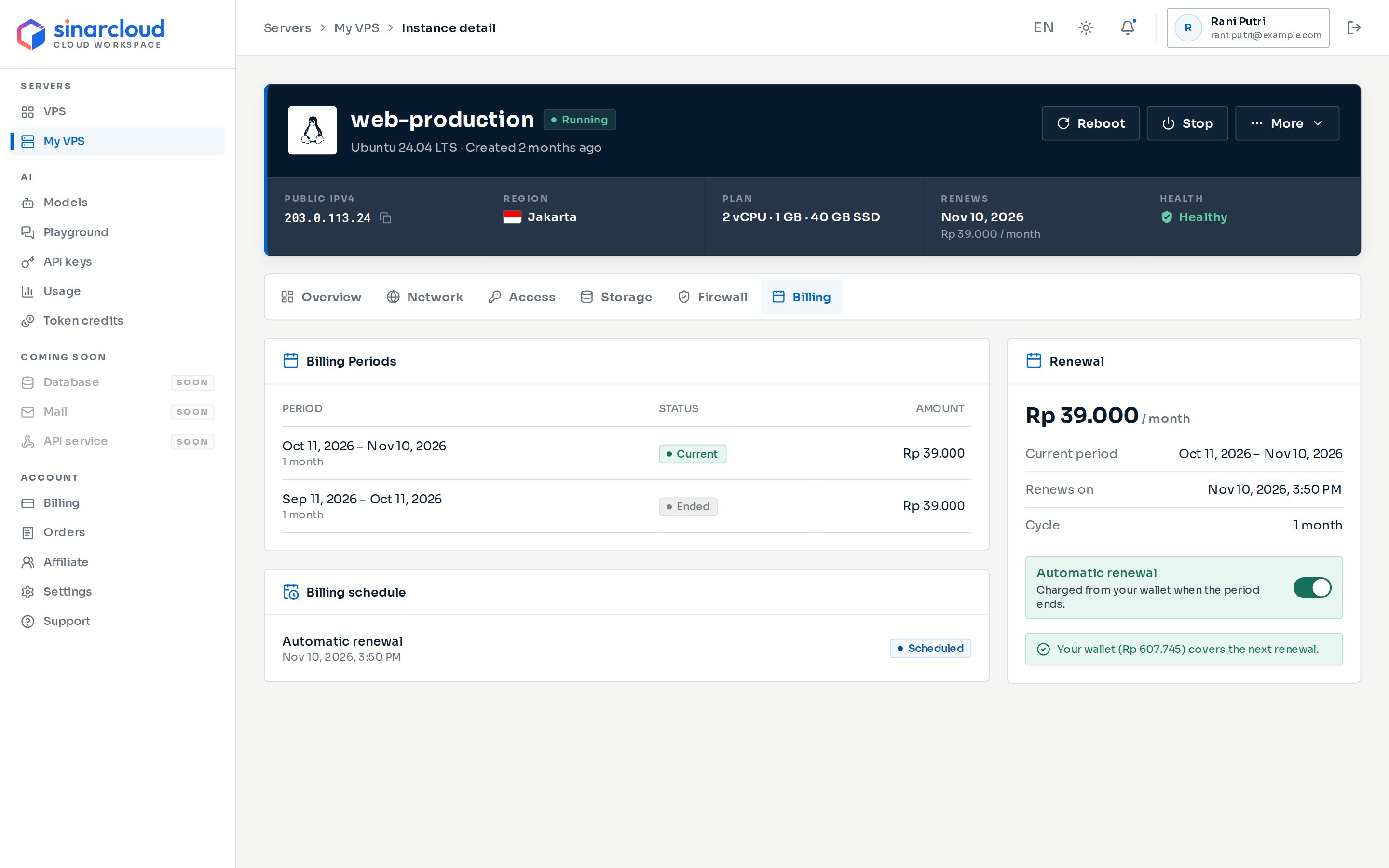
The Billing tab of a server
- The server’s price, followed by the period, for example ”/ month”.
- Current period: the start and end of the period you have paid for.
- Renews on: when the current period ends and the next renewal is charged (3 days earlier for servers on Tencent Cloud). When automatic renewal is off, this reads Deleted on.
- Cycle: the length of each period, for example “1 month”.
- The Automatic renewal switch.
- Whether your balance covers the next renewal. If it doesn’t, the card shows how much to add, with a Top up link that opens the top-up dialog.
- Automatic renewal is the renewal check, at the time the renewal is charged: the end of a period, or 3 days before it for servers on Tencent Cloud. Done means the check ran, not that you were charged. It also shows Done when the renewal failed or automatic renewal was off.
- Deletion after expiry is the automatic deletion after a period ends without renewal.
- At the top of the server’s page, under Renews (or Expires when automatic renewal is off). In the last 7 days, it also shows how long is left.
- In the Billing card on the server’s Overview tab, as Renews on or Expires and is deleted on.
- In the Renewal column of the server list.
Automatic renewal
New servers have automatic renewal turned on. When the current period ends, SinarCloud charges your balance for the next period. Servers on Tencent Cloud are charged earlier, as described below.- Your balance, shown as Current Credits on the Billing page, must cover the full renewal price. SinarCloud doesn’t take partial payments.
- If the charge succeeds, a new period starts and Renews on moves forward. Recent activity on the server’s Overview tab shows Billing period renewed.
- Stopped servers are also renewed and charged. Stopping a server doesn’t pause billing, and a renewal doesn’t start a stopped server. To run it again, click Start at the top of the server’s page.
- Each server renews on its own schedule. If several servers renew around the same time, keep enough balance for all of them.
Servers on Tencent Cloud, shown under Provider on the server’s Overview tab, are charged 3 days before the period ends, so keep enough balance by then. If your balance is short at that point, SinarCloud tries again when the period ends, and only that second try can suspend and delete the server. The Billing schedule then shows a second Automatic renewal row. Once the early charge goes through, the new period shows as Current and Renews on moves to its end. To stop such a server from renewing, turn off automatic renewal at least 3 days before the period ends.
Turn automatic renewal on or off
1
Open the Billing tab
Go to My VPS, select the server, and open the Billing tab.
2
Click the Automatic renewal switch
In the Renewal card, click the Automatic renewal switch. A confirmation dialog opens, Turn off automatic renewal? or Turn on automatic renewal?, explaining what happens when the period ends.
3
Confirm the change
Click Turn off or Turn on. To keep the current setting, click Cancel.
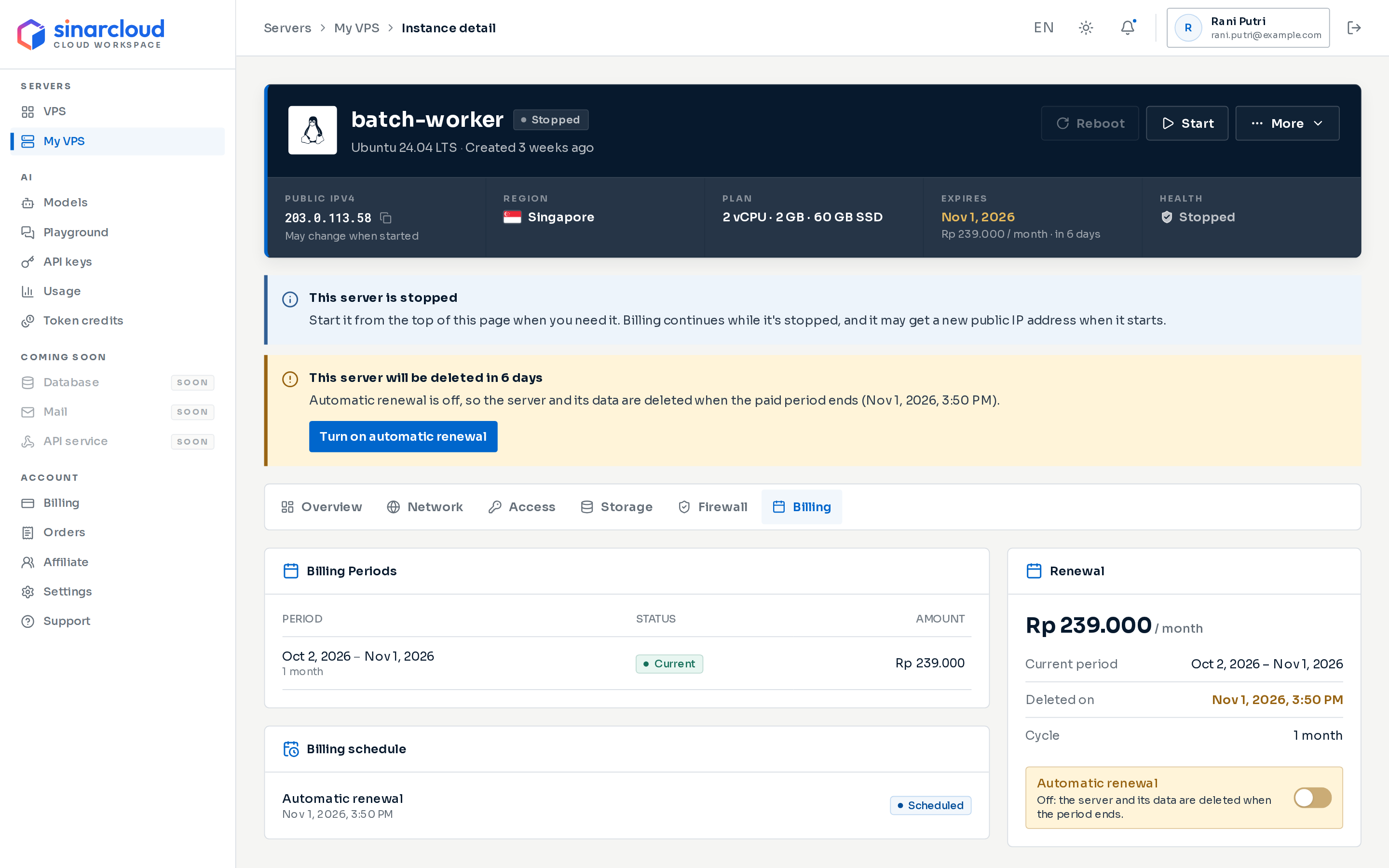
A stopped server with automatic renewal off, near its period end
Reminders
In the last 7 days of a period, the server’s page shows a warning above the tabs when the server is at risk:- When automatic renewal is off, a warning such as This server will be deleted in 3 days. Click Turn on automatic renewal to open the Billing tab, then turn on the switch.
- When your balance doesn’t cover the renewal, a warning such as Top up before the renewal in 3 days. Click Top up wallet to open the top-up dialog with the missing amount filled in, rounded up to the next Rp 1,000 and at least Rp 15,000, the smallest top-up.
- 3 days and 1 day before a period ends, when automatic renewal is off, or when your balance won’t cover the renewal. The balance check in these emails also counts your other servers that renew first.
- After each successful renewal, with the amount charged and the new period.
- When a renewal fails, with the renewal price and the time the server will be deleted, and when a server is deleted after its period ends.
- Before a renewal price goes up, as described in What a renewal costs.
- About data transfer, if SinarCloud counts the server’s data transfer. See Data transfer and renewals.
Servers billed Daily don’t get reminder emails or renewal receipts, because their periods are too short. They still get the emails about a failed renewal and a deletion. Check their balance yourself.
What happens when a period ends
When a renewal fails
If your balance doesn’t cover the renewal price when the period ends, nothing is charged, and SinarCloud suspends the server:- The server’s status changes to Suspended. At the top of the server’s page, Billing shows Renewal failed and Health shows Suspended. Above the tabs, the notice This server is suspended shows the renewal price and when the server will be deleted.
- If the server isn’t renewed by then, 6 hours after the period ended, SinarCloud deletes it with its data. The status changes to Terminating, and the server’s page shows This server is being deleted.
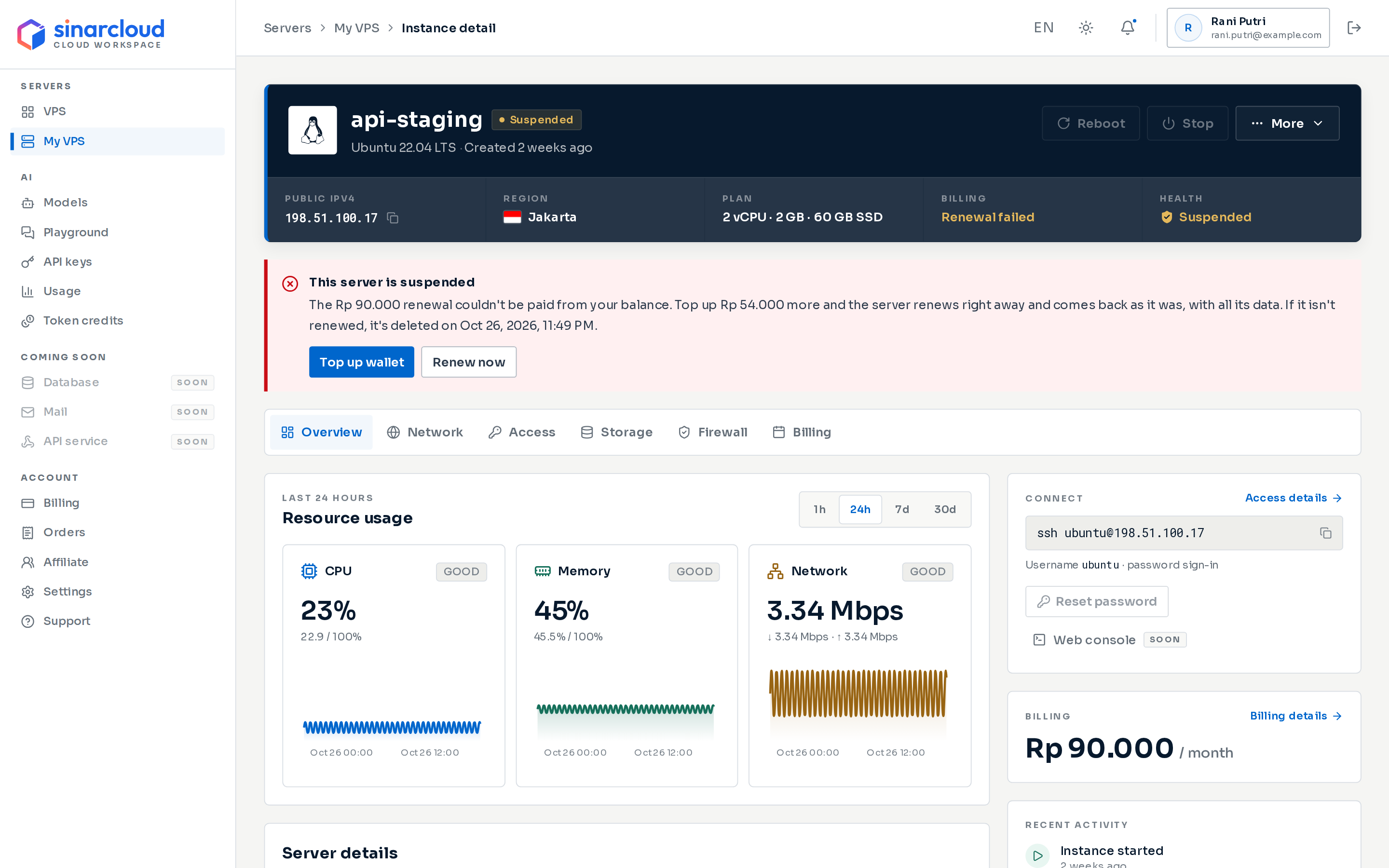
A suspended server: the notice offers Top up wallet and Renew now
- Top up. Click Top up wallet in the notice. The QRIS top-up dialog opens with the missing amount filled in. As soon as the payment comes in, SinarCloud renews the server. You don’t need to do anything else. Any top-up that makes your balance cover the renewal does the same, for example one you start from the Billing page. See Add balance.
- Renew now. If your balance already covers the renewal, click Renew now. Use it when you added balance without a top-up, for example with a coupon, because that doesn’t renew the server on its own. When the renewal goes through, you see Server renewed. If your balance is still too low, the top-up dialog opens instead.
If more than one server is suspended, a top-up renews each one your balance covers, starting with the one that would be deleted first.
A renewal after a suspension costs the same as any renewal, so a first-period discount doesn’t apply again. See What a renewal costs. The new period starts when the unpaid one ended, so the time the server spent suspended counts toward it.
Data transfer and renewals
If SinarCloud counts your server’s data transfer, the server has an allowance for each transfer month. A transfer month is 30 days, counted from when the server was first ready. The console and emails call it the billing month, but it is counted separately from your renewals:- On Monthly billing, each new transfer month starts at the same time as a new billing period.
- On Daily or Weekly billing, transfer months still last 30 days. Renewals don’t reset the allowance.
- At 80% of the allowance, with the subject “server has used n% of this month’s data transfer”. It shows the amount used, the allowance and when the billing month ends.
- When the allowance is used up, with the subject “server is stopped: data transfer allowance used up”, or “server has used its data transfer allowance” if the server was already stopped. It confirms that a stopped server is still billed and renewed as usual.
How renewal charges appear in billing
Each successful renewal is a charge on your balance. To find it, open Billing in the sidebar and select the Transactions tab:- The charge appears as Server renewal, with the server’s name and the period length.
- Amount shows what was charged, and Balance after shows your balance right after the charge.
- The server’s Billing Periods table shows the same amount.
Delete a server before its period ends
Deleting a server stops future renewals. SinarCloud doesn’t refund the unused part of the current period. See Manage a VPS.Add balance
Top up your balance before your next renewal.
Balance and billing
See how your balance pays for servers and AI.