

The plans
Every plan on sale today is weekly and covers DeepSeek V4.1 Flash, model aliasdeepseek/deepseek-v4-1-flash. Plans come in two families, shown as tabs on the Subscriptions page:
- AI Plans count every token of a request, including the input the model reads from its cache.
- Cache-Free AI Plans don’t count tokens read from the cache. They count only new input and output, and give fewer tokens for the same price.
Plans can change. The Subscriptions page always shows the plans on sale to you, with their current prices in your account’s billing currency.
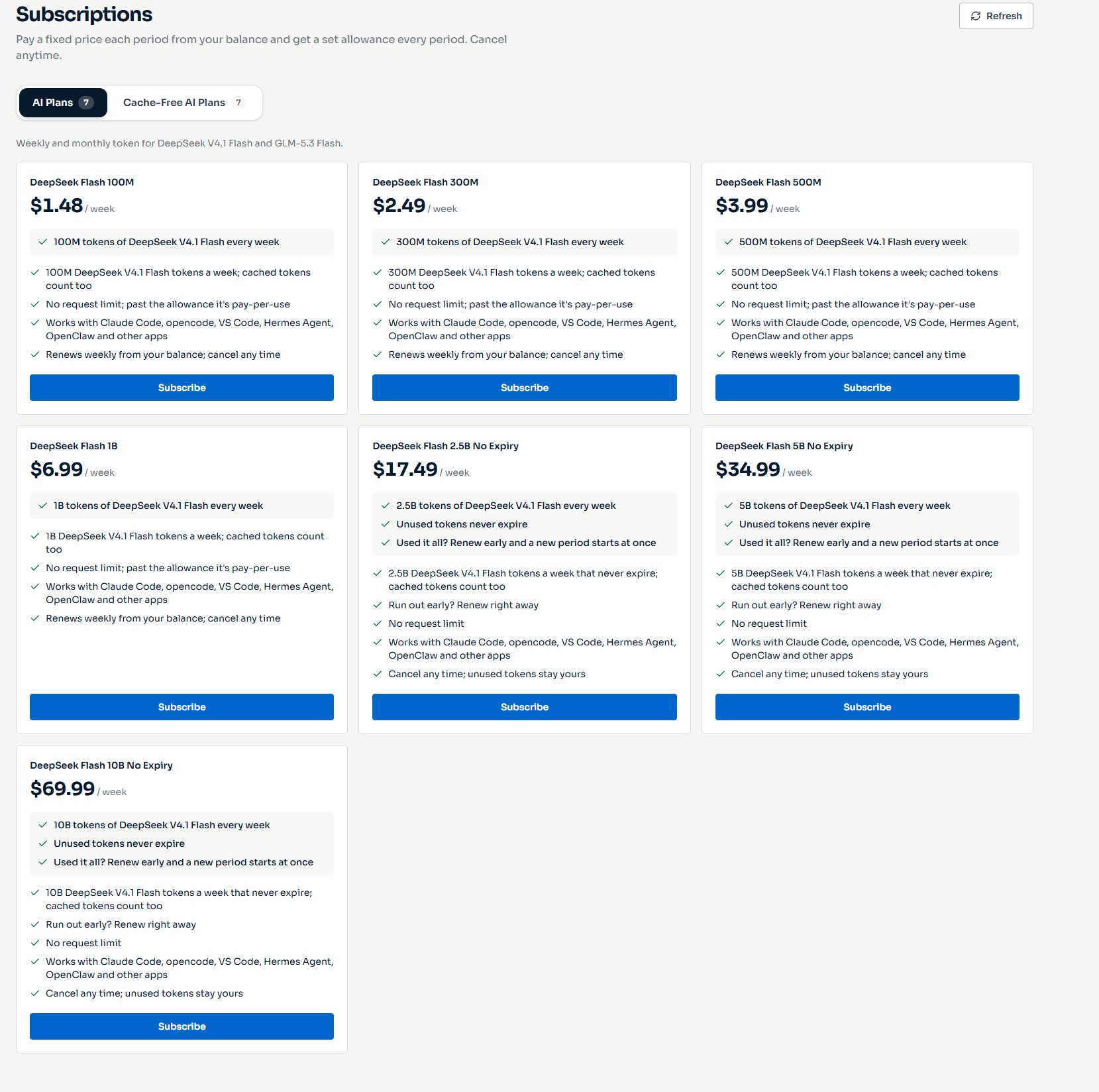
The AI Plans tab of the Subscriptions page, with prices in US dollars
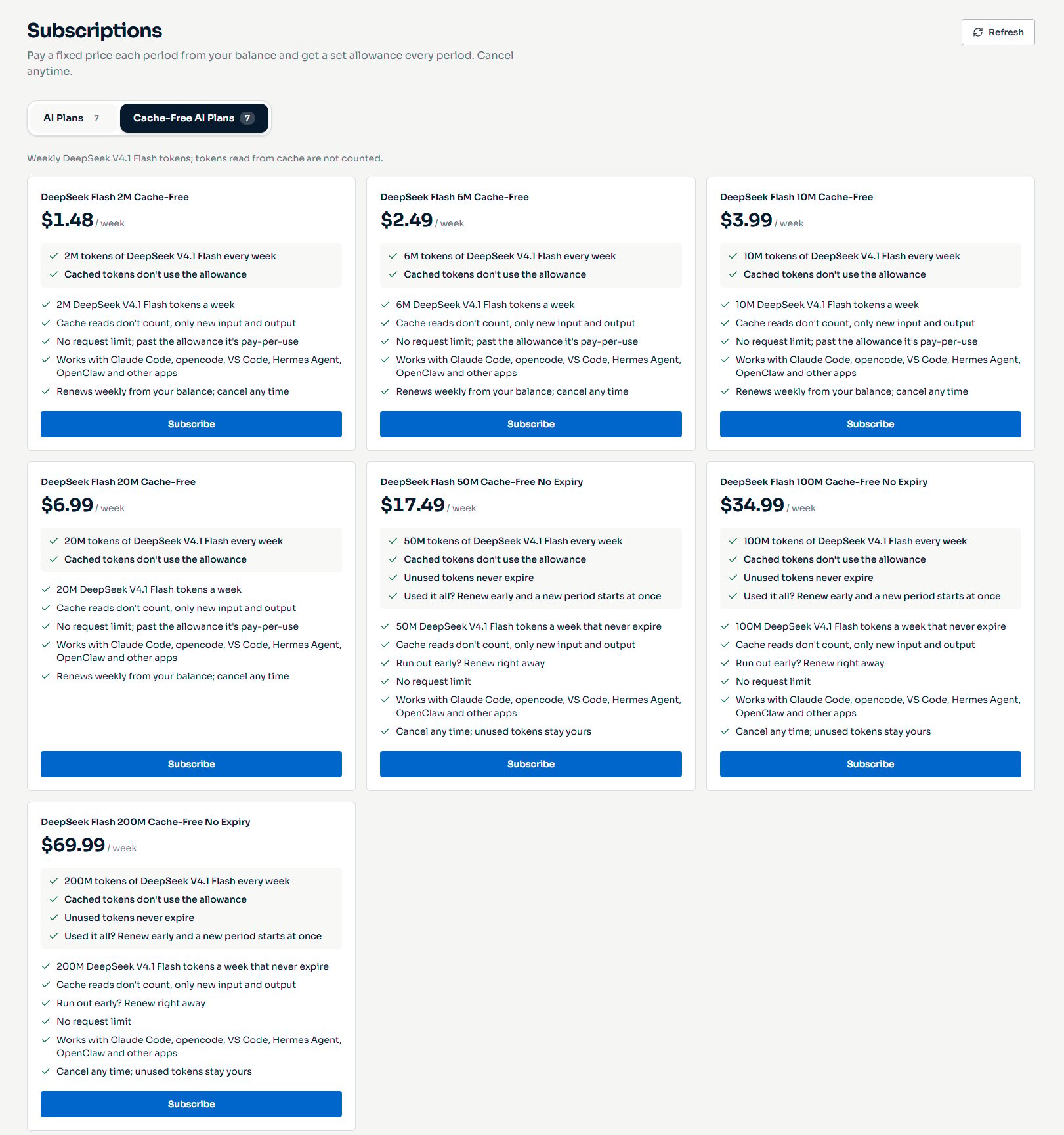
The Cache-Free AI Plans tab, with prices in US dollars
No Expiry plans
Plans whose names end in No Expiry keep their unused tokens. Tokens left at the end of a week carry over to the next week and never expire, even after the subscription ends. If you use up a week’s tokens early, you can renew right away instead of waiting for the week to end. See Renew early. On the other plans, tokens left at the end of the week expire, and the next week starts with a fresh allowance.How plans count tokens
Plan tokens are token credits for DeepSeek V4.1 Flash. Each week’s allowance appears on the Token credits page with the source Plan allowance. A request takes tokens from the plan like this:
On AI Plans, a request takes its total tokens. On Cache-Free AI Plans, it takes its total tokens minus the cached input. For what each kind of token is, see How tokens are counted.
When the plan has enough tokens left, it pays for the whole request, including the cached input and the Rp 0.6 minimum charge. Nothing is charged to your balance, on either family.
When the plan has fewer tokens left than the request takes, the plan pays its share of the request and your balance pays the rest at the model’s normal prices. The plan’s share is the tokens it has left divided by the tokens the request takes. See When the plan runs out.
Good to know:
- Which requests use the plan: every request your account sends to
deepseek/deepseek-v4-1-flash, from any API key, the Playground and tools such as Claude Code. Other models, including DeepSeek V4.1 Flash’s ZDR version, are charged as usual. - Other token credits: if you also have token credits for DeepSeek V4.1 Flash, for example from a gift, the tokens that expire soonest are used first. Tokens that never expire are used last, oldest first.
- Promotions: a promotion on the model discounts only what your balance pays after the plan. A promotion that makes the model free applies first, so the plan’s tokens stay untouched while it runs.
- An empty balance: requests to the model still go through while the plan has tokens left, even when your balance is zero or below.
- No automatic failover: while you have plan tokens for the model, a request that fails isn’t retried another way. You get the error and can send the request again.
Example: a week of usage
This example follows the coding session from Example 6 on the token counting page on two plans with the same price: DeepSeek Flash 100M from AI Plans and DeepSeek Flash 2M Cache-Free. The session sends four requests:On DeepSeek Flash 100M
Every token counts, so each request takes its total tokens:On DeepSeek Flash 2M Cache-Free
Cached input doesn’t count, so each request takes its new input and output:- The session takes 190,700 tokens from DeepSeek Flash 100M and 38,032 from DeepSeek Flash 2M Cache-Free.
- On the Cache-Free plan, the 152,668 cached tokens of requests 2 and 3 cost nothing. They’re part of each request’s price, and the plan pays the whole price.
- Paid from your balance without a plan, the four requests would cost Rp 34.77232 at DeepSeek V4.1 Flash’s prices on 1 November 2026. Prices can change, but the tokens a plan takes don’t depend on them.
Choose a plan family
At the same price, an AI Plans plan gives 50 times the tokens of the Cache-Free plan. Which one lasts longer depends on how much of your input comes from the cache:- A turn like request 3 takes 142,700 tokens from DeepSeek Flash 100M, which then lasts for 700 such turns a week. It takes 10,000 tokens from DeepSeek Flash 2M Cache-Free, which lasts for 200.
- A Cache-Free plan lasts longer only when more than 98% of your tokens are read from the cache.
When the plan runs out
Later that week, DeepSeek Flash 2M Cache-Free has 4,000 tokens left, and the session sends another turn like request 3. The turn takes 10,000 tokens, more than the plan has left:Carry over and renew early
On a No Expiry plan, the same week goes differently. Say you’re on DeepSeek Flash 2.5B No Expiry:- Week 1: you use 1.8B of your 2.5B tokens. The 0.7B left carry over.
- Week 2: the renewal gives you 2.5B new tokens, so you have 3.2B. The 0.7B carried over are used first, because the oldest tokens that never expire go first.
- Midweek: you’ve used all 3.2B. Requests are charged to your balance, and the subscription’s page shows This period’s allowance is used up with a Renew now button.
- Renew now: you pay the plan’s price again. A new week with 2.5B fresh tokens starts at once, and your next renewal moves to a week from then. The days left in the week you were in aren’t refunded.
Subscribe to a plan
1
Open Subscriptions
In the console sidebar, under Account, click Subscriptions. Choose the AI Plans or Cache-Free AI Plans tab.
2
Choose a plan
Click Subscribe on the plan you want. The Subscribe to dialog, named after the plan, shows the price, what the plan includes, the amount Due now, your Wallet balance and the Balance after.
3
Top up if your balance is short
If your balance doesn’t cover the price, the dialog says how much to top up and shows Top up wallet. Pay by QRIS, then click Back to the plan. See Add balance.
4
Agree and pay
Read the terms in the dialog, tick I’ve read and understood how SinarCloud processes tokens, and click the Pay button with the price, for example Pay Rp 15,000. The full price is paid from your balance, the first week starts right away, and its tokens are ready to use.
Manage your subscription
Your plans appear under Your subscriptions at the top of the Subscriptions page, with the tokens left this week. Click a plan to open its page. It shows the tokens left, when unused tokens expire or that they carry over, the current period, the next renewal and what each week includes.Renewals
A week is 7 days, counted from the moment you subscribed, not a calendar week. Shortly before each week ends, SinarCloud charges the plan’s price from your balance, and the new week starts the moment the old one ends. This repeats until you cancel. Your available balance must cover the full price. If you used AI on credit and your balance is below zero, the renewal needs that amount too. A day before a renewal, SinarCloud emails the account’s owners if your balance is short, and the subscription’s page shows Top up before your renewal with a Top up wallet button. If your balance doesn’t cover the renewal:- SinarCloud tries again every hour until the week ends. A QRIS top-up retries it at once.
- If it’s still unpaid when the week ends, the subscription shows Payment due, and the Renewal not paid notice gives a date to top up by. Until then, the plan gives no new tokens.
- When you top up in time, the plan restarts as soon as the payment comes in, with a full week from then. The time it was unpaid has no plan tokens.
- If you don’t top up by that date, the subscription ends.
Change your plan
Click Change plan on the subscription’s page, or Upgrade or Switch to this plan on another plan in the same family. The dialog says what the change does before you confirm.- A bigger plan in the same family starts now. You pay the price difference for the rest of the current week and get the extra tokens for the rest of the week. From your next renewal, you pay the new plan’s price.
- A smaller plan starts at your next renewal. Nothing is charged now. To keep your current plan instead, open Change plan again and choose Keep with your plan’s name.
Renew early
On a No Expiry plan, once you’ve used every token of the plan, carried-over tokens included, the subscription’s page offers Renew now. Click it, check the amount, and click Pay with the price and renew, for example Pay Rp 187,500 and renew. A new week with a fresh allowance starts at once, and your next renewal moves to a week from then. The days left in the current week aren’t refunded. You can renew early again each time the new allowance runs out.Cancel
Click Cancel subscription on the subscription’s page, then confirm. The plan stays active until the end of the week you paid for, then ends. Payments aren’t refunded. Until the week ends, you can click Resume subscription to keep it. If a renewal is unpaid, cancelling ends the subscription at once.Where you see plan payments and tokens
- Billing: each payment for a plan appears on the Transactions tab as Subscription. See Balance and billing.
- Token credits: each week’s allowance is a grant with the source Plan allowance. See Token credits.
- Usage: a request the plan paid for shows the tokens it covered under Token credits in its Charge breakdown. See Usage and spending.
How tokens are counted
Input, cached, output and reasoning tokens, with worked examples.
Token credits
How prepaid tokens apply and expire.