

What a token is
A token is a small piece of text: a short word, part of a longer word, a number or a punctuation mark. Models read your input and write their output as tokens. Each model splits text into tokens in its own way, so the same text can be a different number of tokens on different models. As a rough guide, one token is about four characters of English text. Other languages, code and numbers often take more tokens for the same length. Images you send also count as input tokens, and the model decides how many.The tokens in a request
If a model has no cache read price, or no price for a cache write duration, those tokens are charged at the input price. Each model’s prices are on Models and pricing.
A request doesn’t remember earlier requests. To continue a conversation, your app sends the whole conversation again, so every earlier message and reply counts as input tokens again. Input tokens grow as a conversation gets longer.
Where the counts come from
The model counts the tokens of each request and reports the counts with its reply. SinarCloud records those counts, and they’re the counts you’re charged for. You see them in the API response, in the Playground and on the Usage page. SinarCloud records the counts of a streamed request too, even when your request doesn’t ask for them in the stream.When SinarCloud counts the tokens itself
Sometimes a reply arrives without the model’s counts, for example when you stop a stream before it ends. SinarCloud then counts the tokens itself, from your request and the output that was sent to you, and charges that count. It’s an estimate, so it can differ from the model’s own count. An estimate doesn’t know which input came from the cache, so all of its input tokens are charged at the input price. If the model stops a stream before it finishes:- When none of the answer has reached you yet, SinarCloud sends the request to the model once more, and the stream continues with the new reply. You’re charged once, for the request that finished.
- When part of the answer has already reached you, or the second try is cut off too, the stream ends with the error “The model’s answer was cut off before it finished. Send the request again.” That request isn’t charged.
Total tokens
Total tokens are the input tokens plus the output tokens:- API response:
usage.total_tokenson the OpenAI format endpoints. The Anthropic Messages format has no total, so add its counts as shown in Anthropic Messages format. - Playground: under each reply, next to the input and output tokens.
- Usage page: the Tokens column of the Log shows each request’s total. The Tokens processed card adds up the totals of every request in the date range.
- Token credits: a request uses one token of credit for each input token and each output token, so as many as its total. See Token credits.
Read the counts in an API response
OpenAI format
A chat completion returns its counts inusage. For the request in the example above, it looks like this:
Some models add other fields to
usage, or leave out a details field they don’t report. Treat a missing count as zero.
To print the counts with the OpenAI SDK for Python:
usage in a streamed chat completion, add "stream_options": {"include_usage": true} to the request. The counts then arrive in the last chunk of the stream.
/v1/completions uses the same fields as chat completions. The other OpenAI format endpoints name the counts differently:
/v1/responses:input_tokens, with the cached input ininput_tokens_details.cached_tokens. Thenoutput_tokens, with the reasoning tokens inoutput_tokens_details.reasoning_tokens, andtotal_tokens./v1/embeddings:prompt_tokensandtotal_tokens. Embeddings have no output tokens.
Anthropic Messages format
/v1/messages reports the input in parts. The same request looks like this:
input_tokens counts only the input that wasn’t read from or written to the cache. To get the input tokens that SinarCloud charges and shows, add the three input fields. A field the model doesn’t report can be missing; count it as zero.
output_tokens includes any thinking the model does. The Messages format has no total field.
From tokens to a charge
The full price of a request is:Example 1: a short request
You send 800 input tokens and get 200 output tokens back, so 1,000 tokens in total. Nothing comes from the cache.Example 2: a request that reads the cache
This is the request from Total tokens: 2,000 input tokens with 1,500 of them cached, and 400 output tokens with 150 of them reasoning.
Without the cache, the same 2,000 input tokens would cost Rp 20 instead of Rp 6.5, and the full price would be Rp 36. The cache changes the price, not the count: the total is 2,400 tokens either way. The request’s cache hit is 1,500 ÷ 2,000 = 75%.
Example 3: a request that writes the cache
On a model with a cache write price, you can mark the start of your prompt for caching withcache_control. See Prompt caching. Say the first request writes those 1,500 tokens to the cache, with the standard duration:
Writing to the cache costs more than plain input. It pays off when later requests read those tokens back while they’re cached: each one then costs Rp 22.5, as in Example 2, instead of Rp 36.
Example 4: a very small request
You send 20 input tokens and get 5 output tokens back.
The tokens cost Rp 0.4, which is below the minimum, so the full price is Rp 0.6. Requests on a free model, and requests that use no tokens, stay free.
Example 5: token credits pay part of a request
You have 1,000 tokens of credit left for the model, and you send the request from Example 2: 2,400 tokens with a full price of Rp 22.5. Credits cover 1,000 of its 2,400 tokens, so they pay the same share of the price:Example 6: a coding session paid from token credits
Token credits count every token once, whether it came from the cache or not. Say you have 100,000,000 tokens of credit for DeepSeek V4.1 Flash, and you send these four requests:
Each request uses its total tokens from your credits:
- Tokens used is the uncached input, the cached input and the output added up: the request’s total tokens. Your token credits cover all of them, so Tokens left goes down by the total each time.
- Full price is what the same request costs from your balance when you have no token credits for the model. It uses DeepSeek V4.1 Flash’s prices on 31 October 2026: input Rp 800, cache read Rp 40 and output Rp 200 per 1M tokens. Prices can change, so check the Models page for the current ones.
- Request 3 uses the most credit, 142,700 tokens, but its full price is only Rp 12.888. Most of its input came from the cache, which is cheap in rupiah, but each cached token still uses one token of credit.
- The tokens of request 4 cost Rp 0.32, which is below the minimum, so its full price is Rp 0.6.
See the counts in the console
On the Usage page
- In the console sidebar, under AI, click Usage.
- On the Log tab, click Show details on a request.
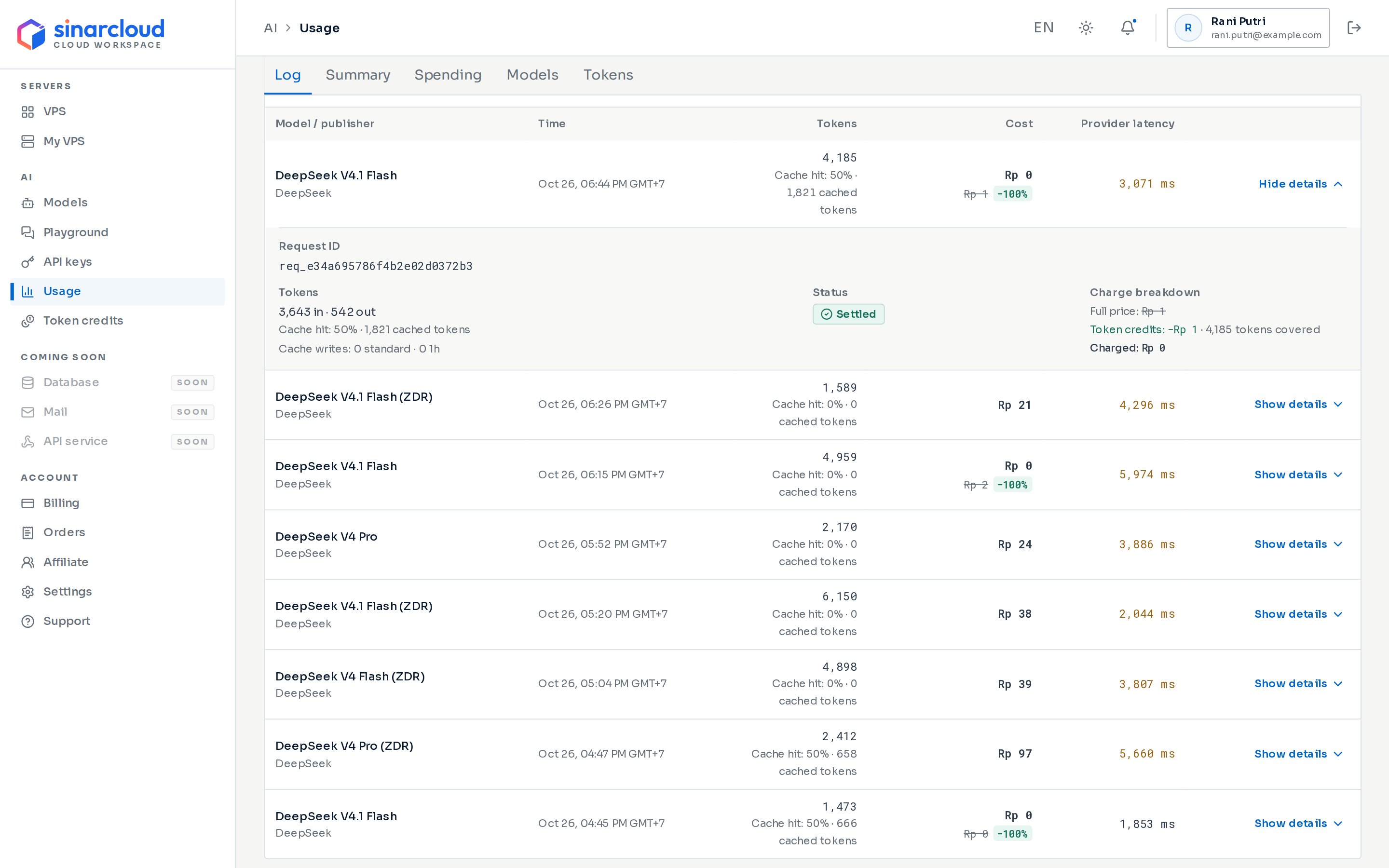
A request's tokens in the Log
- 3,643 in · 542 out under Tokens: 3,643 input tokens and 542 output tokens. The Tokens column shows their total, 4,185.
- Cache hit: 50% · 1,821 cached tokens: 1,821 of the 3,643 input tokens came from the cache. 1,821 ÷ 3,643 is 50%, rounded.
- Cache writes: 0 standard · 0 1h: the request wrote nothing to the cache.
- 4,185 tokens covered next to Token credits: token credits paid for every input and output token of the request.
In the Playground
Under each reply, the Playground shows the input, output and total tokens, and the cache hit. When billing is final, they update to the counts you were charged for. See Playground.Count tokens before you send
POST /v1/messages/count_tokens counts the input tokens of an Anthropic Messages request without running it. It’s free, and it doesn’t need max_tokens.
input_tokens. SinarCloud counts them itself instead of asking the model, so the count is an estimate. The input tokens the model reports when you send the request are the ones you’re charged for, and they can differ.
The OpenAI format has no count endpoint. To see how many tokens a prompt uses, send it once with a low output limit, or try it in the Playground, and read the counts.
Use fewer tokens
- Start a new conversation when you change topics. Every request sends the whole conversation again.
- Keep the parts that don’t change, such as the system prompt and tool definitions, at the start of your prompt. Models that cache can then read them from the cache, at the cache read price.
- Set an output limit with
max_completion_tokensormax_tokens, so a reply can’t run longer than you need. Output tokens usually cost more than input tokens. - Reasoning tokens are output tokens. A model that reasons can write many more tokens than the answer itself.
- Give each app or tool its own API key, then filter the Usage page by that key to see how many tokens it uses.
Models and pricing
See each model’s input, output and cache prices.
Usage and spending
Track the tokens and charges of every request.