Add SinarCloud to OpenCode, the open source coding agent for the terminal, and run it on SinarCloud models through the OpenAI Chat Completions format.
OpenCode is an open source coding agent that runs in your terminal. It can send its requests to any OpenAI-compatible API. Add SinarCloud to OpenCode’s config file, and OpenCode runs on SinarCloud models, charged to your balance.This guide was last checked with OpenCode 1.19.4.
Get an API key and a model alias as described in Before you connect. The base URL is https://ai.sinarcloud.com/v1.
1
Install OpenCode
Open a terminal in your project’s root folder. If you use VS Code, open your project, then open the Command Palette and run Terminal: Create New Terminal. The terminal opens in the project’s folder.Install OpenCode with npm, or see the OpenCode documentation for other ways to install it:
npm install -g opencode-ai
To check that it’s installed, run:
opencode --version
OpenCode prints its version, for example 1.19.4.
OpenCode prints its version
2
Create opencode.json in your project
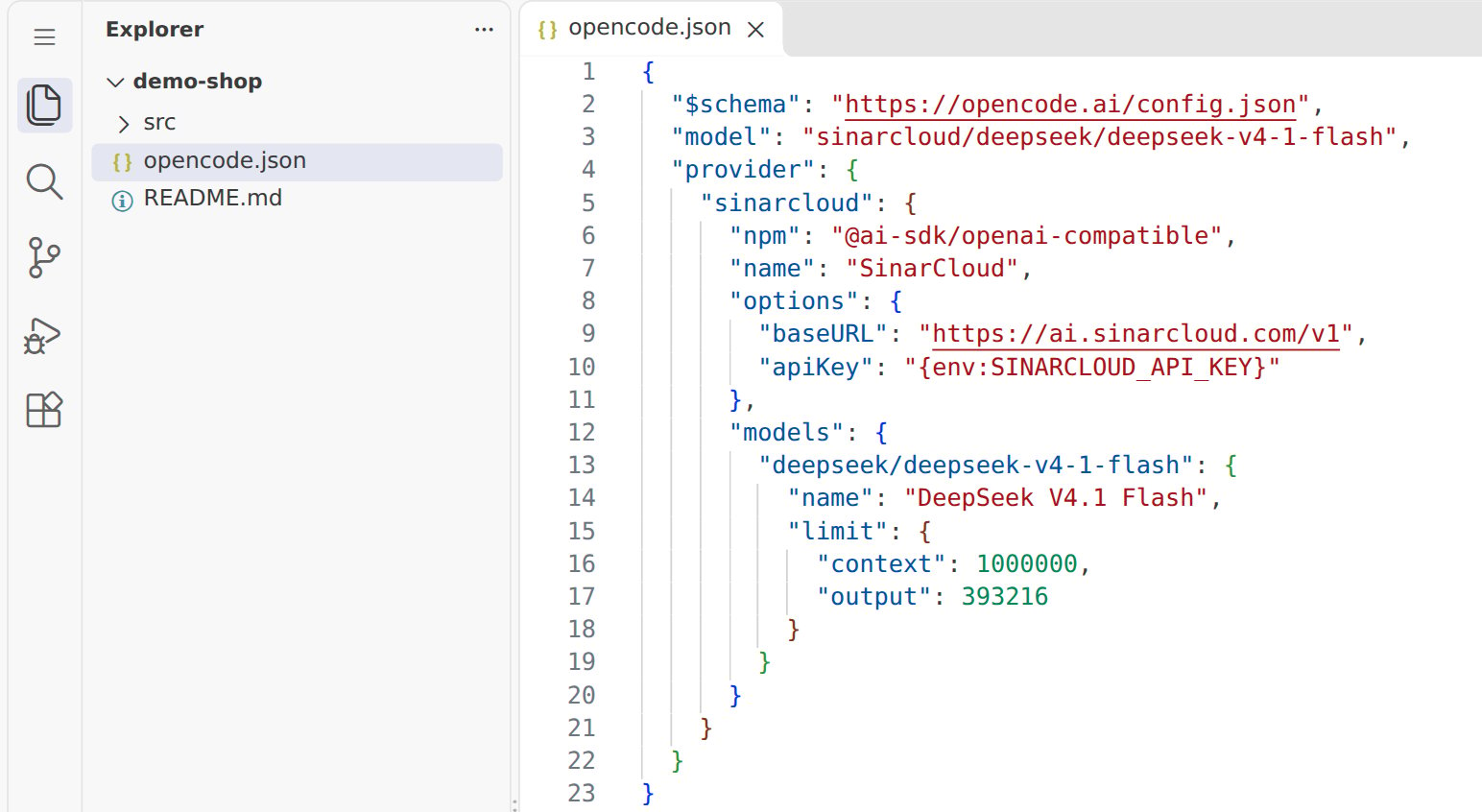
OpenCode reads its settings from a file named opencode.json. To use SinarCloud in one project, create opencode.json in the project’s root folder and paste the following into it. To use it in every project on macOS or Linux, create the file at ~/.config/opencode/opencode.json instead. If the file already exists, add the model and provider keys to it.
opencode.json in the project's root folder, with the SinarCloud base URL
Here’s what each part does:
provider.sinarcloud adds SinarCloud to OpenCode under the ID sinarcloud. The @ai-sdk/openai-compatible package makes OpenCode use the OpenAI Chat Completions format.
baseURL makes OpenCode send its requests to https://ai.sinarcloud.com/v1.
{env:SINARCLOUD_API_KEY} makes OpenCode read your API key from the environment variable, so your key isn’t stored in the file.
Each key under models is a model alias from the Models page, and name is the name OpenCode shows for it. Set limit.context and limit.output to the model’s Context window (tokens) and Maximum output (tokens), which OpenCode uses to manage long conversations.
model sets the default model: sinarcloud/ followed by the model alias.
The console can write this file for you. On the Models page, click Details on a model, then open the Use via API tab and its OpenCode tab. It shows a config for that model with the base URL filled in. Before you save it, replace YOUR_API_KEY with {env:SINARCLOUD_API_KEY}.
3
Set your API key in the terminal
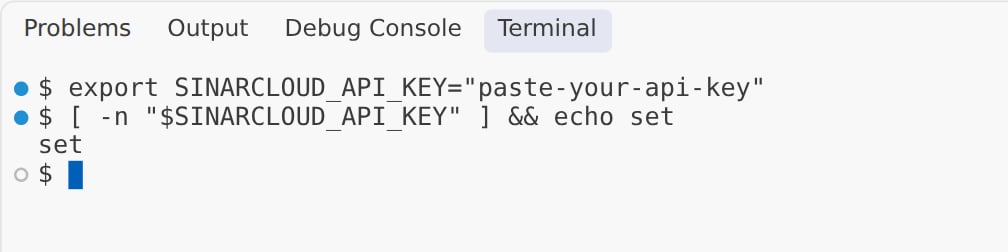
In the same terminal, set the SINARCLOUD_API_KEY environment variable to your API key, then check that it’s set:
macOS and Linux
Windows PowerShell
export SINARCLOUD_API_KEY="paste-your-api-key"[ -n "$SINARCLOUD_API_KEY" ] && echo set
Replace paste-your-api-key with your key, and keep the quotes. The check prints set without showing your key. If you already saved the key for every new terminal, as described in Before you connect, run only the check.
The key is set in the terminal, and the check prints set
The variable lasts until you close the terminal, so start OpenCode from this terminal.
4
Start OpenCode
In the same terminal, in your project’s root folder, start OpenCode:
opencode
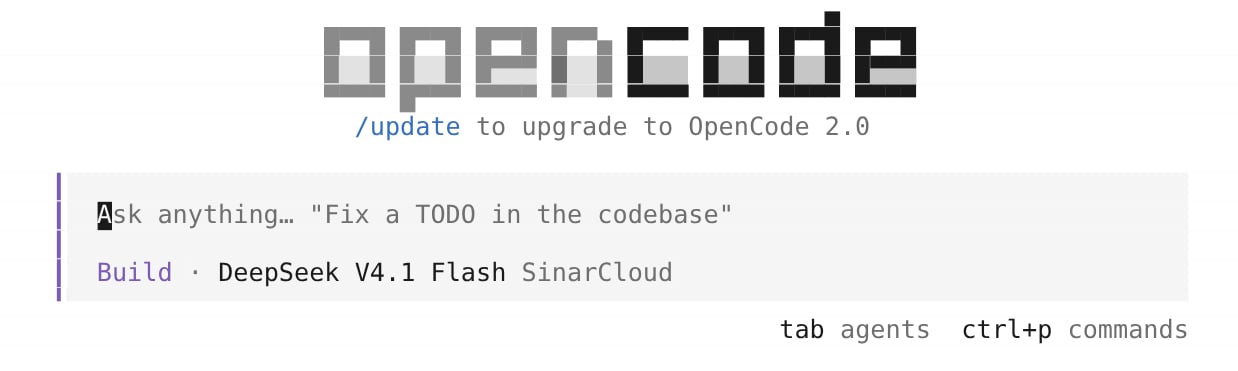
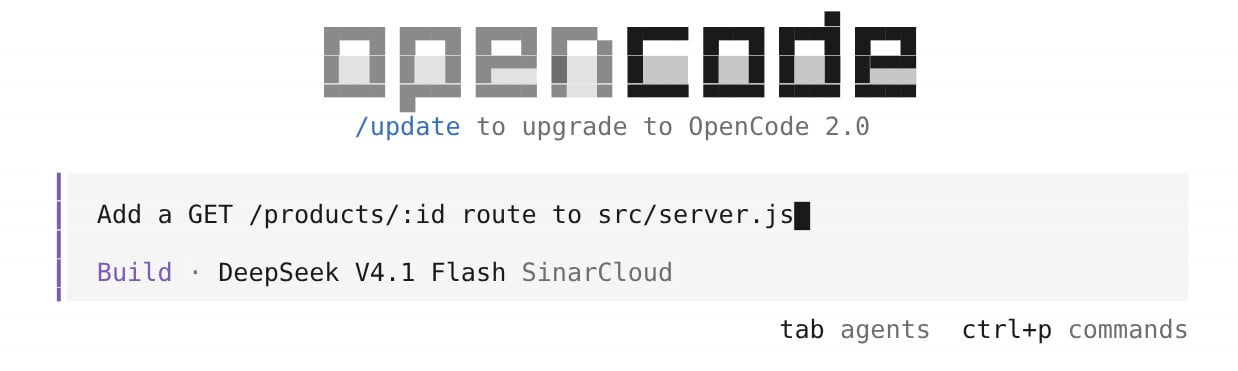
OpenCode opens in the terminal. In the prompt box, under the placeholder text, OpenCode shows the agent, Build, and the model, DeepSeek V4.1 Flash, followed by SinarCloud.
OpenCode started, with DeepSeek V4.1 Flash from SinarCloud
5
Check the model with /models
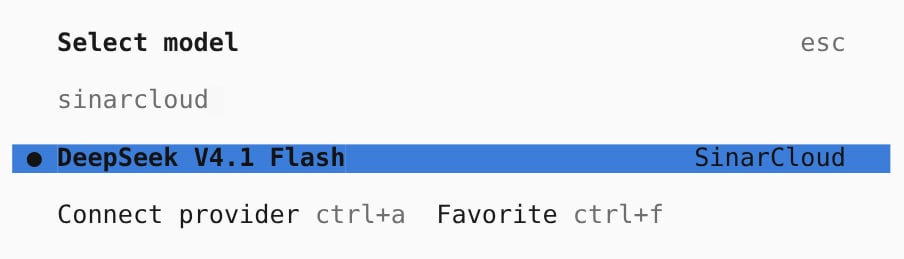
Type /models and press Enter. In Select model, type sinarcloud to show only the models you added for SinarCloud. A dot marks the model OpenCode uses. To switch to another model you added, select it and press Enter. To close the list, press Esc.The full list also shows models under other headings, such as OpenCode. Only the models under SinarCloud use your SinarCloud API key.
Select model, filtered to SinarCloud
6
Send a prompt
Type a task in the prompt box, for example Add a GET /products/:id route to src/server.js, and press Enter.
A task in OpenCode's prompt box, ready to send
To try the connection without opening the full interface, send a single prompt from the terminal instead:
opencode run "Say hello in Indonesian."
The output starts with the agent and model that answered, for example build · deepseek/deepseek-v4-1-flash.
7
Find the requests in Usage
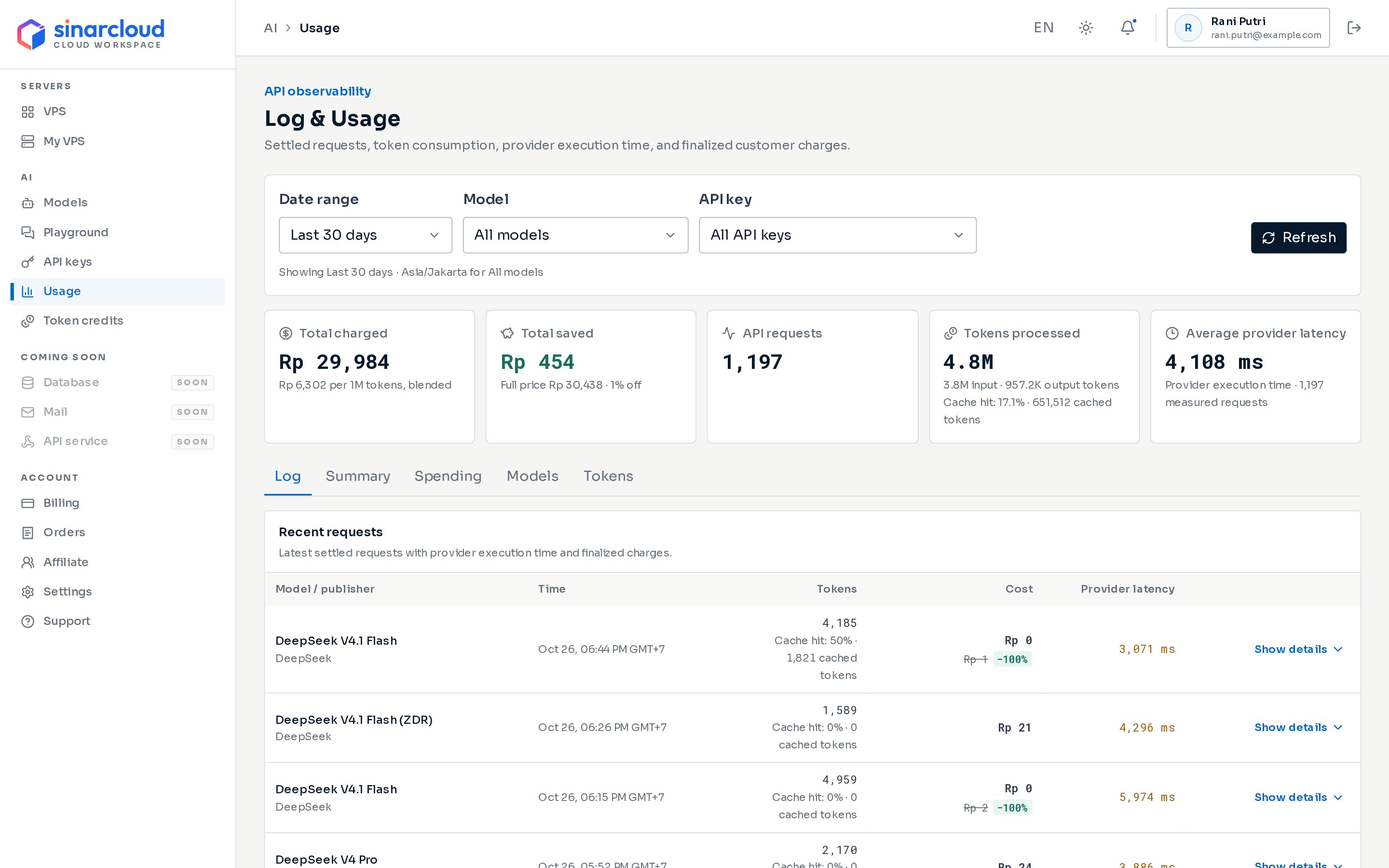
In the console, under AI, click Usage, then choose the key you created for OpenCode in the API key filter. When you start a session, OpenCode usually sends two requests: one that names the session and one for your prompt. Only requests whose charge is final appear, so click Refresh if you don’t see them yet.
The Usage page, with the API key filter at the top
Add each model you want to use under models, with its alias as the key. To use a lower-cost model for small tasks such as naming sessions, set small_model. Otherwise, OpenCode uses your default model for them too.
OpenCode shows errors from SinarCloud after Error:.
Error: Invalid API key.
The API key is missing, mistyped, expired, or revoked. Check that SINARCLOUD_API_KEY is set in the terminal where you started OpenCode and that it holds your whole key. If the key has expired or been revoked, create a new one.
Error: The requested model does not exist or is not available for this endpoint.
The model alias doesn’t exist, the model isn’t available right now, or it doesn’t support chat completions. Copy the alias again from the Models page and check that the key under models matches it exactly, and that model is sinarcloud/ followed by the same alias. Then check that the model’s Model capabilities list Chat completions.
Error: Your balance is empty or negative and no token credits remain for this model.
{"docsConfig":{"theme":"mint","$schema":"https://mintlify.com/docs.json","name":"SinarCloud","description":"Documentation for SinarCloud: deploy VPS in Southeast Asia, call AI models through one OpenAI-compatible API, and manage your prepaid IDR balance.","colors":{"primary":"#0066CC","light":"#6AAAEB","dark":"#004D99"},"logo":{"light":"https://mintcdn.com/sinar-cloud/B5Imz7vUklgE_ozS/logo/light.svg?fit=max\u0026auto=format\u0026n=B5Imz7vUklgE_ozS\u0026q=85\u0026s=e9d750a5729c82b08c0c002770ca98b0","dark":"https://mintcdn.com/sinar-cloud/B5Imz7vUklgE_ozS/logo/dark.svg?fit=max\u0026auto=format\u0026n=B5Imz7vUklgE_ozS\u0026q=85\u0026s=73748aa26054037a0788d4f33711e8fc","href":"https://sinarcloud.com"},"favicon":"https://mintcdn.com/sinar-cloud/B5Imz7vUklgE_ozS/favicon.svg?fit=max\u0026auto=format\u0026n=B5Imz7vUklgE_ozS\u0026q=85\u0026s=3a8c6e463fff5c4bbd253aa1aa394f3a","navbar":{"links":[{"href":"mailto:support@sinarcloud.com","label":"Support"}],"primary":{"type":"button","label":"Open console","href":"https://console.sinarcloud.com"}},"footer":{"links":[{"header":"SinarCloud","items":[{"label":"Website","href":"https://sinarcloud.com"},{"label":"Console","href":"https://console.sinarcloud.com"},{"label":"VPS pricing","href":"https://sinarcloud.com/vps"}]},{"header":"Help","items":[{"label":"Email support","href":"mailto:support@sinarcloud.com"},{"label":"Legal","href":"https://sinarcloud.com/legal"}]}]},"contextual":{"options":["copy","view","chatgpt","claude","perplexity","mcp","cursor","vscode"],"display":"header"},"styling":{"latex":false},"navigation":{"pages":[]}},"deployment":{"deploymentMetadataValue":{"subdomain":"sinar-cloud","hasAudioNarration":false,"actualSubdomain":"sinar-cloud","customDomains":["docs.sinarcloud.com"],"gitSource":{"type":"github","owner":"mintlify-community","repo":"docs-sinar-cloud-bc5a92e3","deployBranch":"main","contentDirectory":"","isPrivate":true,"mountPath":"","label":""},"chroma":{"latestBuiltDeploymentHistoryId":"6ae76f01039e90b0fea263d5","collectionId":"78c6943e-12ad-464b-8ab6-c16ab533d6c1","liveDeploymentHistoryId":"6ae76f01039e90b0fea263d5","schemaVersion":"v3"},"entitlements":{"AI_CHAT":{"status":"DISABLED"},"WEB_MCP":{"status":"DISABLED"},"NARRATION":{"status":"DISABLED"}},"buildId":"6ae76f01039e90b0fea263d5","clientVersion":"0.0.4054","searchFilterCounts":[{"language":"default","tag":"Guides","count":26},{"language":"default","tag":"AI API","count":9},{"language":"default","tag":"Integrations","count":9},{"language":"default","tag":"VPS","count":6},{"language":"default","tag":"Billing","count":4},{"language":"default","tag":"VS Code","count":4},{"language":"default","tag":"Get started","count":3},{"language":"default","tag":"Start here","count":3},{"language":"default","tag":"Account","count":2},{"language":"default","tag":"Help","count":2}]},"assistantConfig":{"enableAskAiButton":false,"enableStarterQuestions":false,"enableContextualStarterQuestions":false,"enableAskAiSearchBar":true},"basePath":"","hasChatPermissions":false,"hasWebMcpPermissions":false,"toggles":[{"name":"kill-isr","enabled":true,"variant":{"name":"disabled","enabled":false,"feature_enabled":true},"impressionData":false},{"name":"agent-mintlify-slack","enabled":true,"variant":{"name":"disabled","enabled":false,"feature_enabled":true},"impressionData":false},{"name":"agent-integrations-settings","enabled":true,"variant":{"name":"disabled","enabled":false,"feature_enabled":true},"impressionData":false},{"name":"automations-pr-grouping","enabled":true,"variant":{"name":"disabled","enabled":false,"feature_enabled":true},"impressionData":false},{"name":"custom-prefix","enabled":true,"variant":{"name":"disabled","enabled":false,"feature_enabled":true},"impressionData":false},{"name":"analytics-v7","enabled":true,"variant":{"name":"disabled","enabled":false,"feature_enabled":true},"impressionData":false},{"name":"user-flows-analytics","enabled":true,"variant":{"name":"disabled","enabled":false,"feature_enabled":true},"impressionData":false},{"name":"no-publish-flow","enabled":true,"variant":{"name":"disabled","enabled":false,"feature_enabled":true},"impressionData":false},{"name":"workos-onboarding","enabled":true,"variant":{"name":"disabled","enabled":false,"feature_enabled":true},"impressionData":false},{"name":"llms-txt-v2","enabled":true,"variant":{"name":"disabled","enabled":false,"feature_enabled":true},"impressionData":false},{"name":"snapshot-serving-live","enabled":true,"variant":{"name":"disabled","enabled":false,"feature_enabled":true},"impressionData":false},{"name":"stripTemperatureMiddleware","enabled":true,"variant":{"name":"disabled","enabled":false,"feature_enabled":true},"impressionData":false},{"name":"support-platform-pylon-zendesk","enabled":true,"variant":{"name":"disabled","enabled":false,"feature_enabled":true},"impressionData":false},{"name":"snapshot-serving","enabled":true,"variant":{"name":"disabled","enabled":false,"feature_enabled":true},"impressionData":false},{"name":"instant-rollback","enabled":true,"variant":{"name":"disabled","enabled":false,"feature_enabled":true},"impressionData":false},{"name":"granular-notifications-server","enabled":true,"variant":{"name":"disabled","enabled":false,"feature_enabled":true},"impressionData":false},{"name":"granular-notifications","enabled":true,"variant":{"name":"disabled","enabled":false,"feature_enabled":true},"impressionData":false},{"name":"automations-fable","enabled":true,"variant":{"name":"disabled","enabled":false,"feature_enabled":true},"impressionData":false},{"name":"fixed-ai-action-pricing","enabled":true,"variant":{"name":"disabled","enabled":false,"feature_enabled":true},"impressionData":false},{"name":"automation-resolve-merge-conflict","enabled":true,"variant":{"name":"disabled","enabled":false,"feature_enabled":true},"impressionData":false},{"name":"scoped-publishing","enabled":true,"variant":{"name":"disabled","enabled":false,"feature_enabled":true},"impressionData":false},{"name":"mintql","enabled":true,"variant":{"name":"disabled","enabled":false,"feature_enabled":true},"impressionData":false},{"name":"page-level-analytics","enabled":true,"variant":{"name":"disabled","enabled":false,"feature_enabled":true},"impressionData":false},{"name":"editor-version-history-v2","enabled":true,"variant":{"name":"disabled","enabled":false,"feature_enabled":true},"impressionData":false},{"name":"billing-page-v2","enabled":true,"variant":{"name":"disabled","enabled":false,"feature_enabled":true},"impressionData":false},{"name":"full-page-search","enabled":true,"variant":{"name":"disabled","enabled":false,"feature_enabled":true},"impressionData":false},{"name":"workspace-projects","enabled":true,"variant":{"name":"disabled","enabled":false,"feature_enabled":true},"impressionData":false},{"name":"assistant-v5","enabled":true,"variant":{"name":"disabled","enabled":false,"feature_enabled":true},"impressionData":false},{"name":"byok-sep-25","enabled":true,"variant":{"name":"disabled","enabled":false,"feature_enabled":true},"impressionData":false},{"name":"fork-pr-previews","enabled":true,"variant":{"name":"disabled","enabled":false,"feature_enabled":true},"impressionData":false},{"name":"revalidation-jwt","enabled":true,"variant":{"name":"disabled","enabled":false,"feature_enabled":true},"impressionData":false},{"name":"vite-origin","enabled":true,"variant":{"name":"disabled","enabled":false,"feature_enabled":true},"impressionData":false},{"name":"billing-updated-9-15","enabled":true,"variant":{"name":"disabled","enabled":false,"feature_enabled":true},"impressionData":false},{"name":"workos-sso-scim","enabled":true,"variant":{"name":"disabled","enabled":false,"feature_enabled":true},"impressionData":false},{"name":"hobby-abuse-scan","enabled":true,"variant":{"name":"disabled","enabled":false,"feature_enabled":true},"impressionData":false},{"name":"dashboard-inbox","enabled":true,"variant":{"name":"disabled","enabled":false,"feature_enabled":true},"impressionData":false},{"name":"workos-signup","enabled":true,"variant":{"name":"disabled","enabled":false,"feature_enabled":true},"impressionData":false},{"name":"turbopuffer-dual-write","enabled":true,"variant":{"name":"disabled","enabled":false,"feature_enabled":true},"impressionData":false},{"name":"workos-enabled","enabled":true,"variant":{"name":"disabled","enabled":false,"feature_enabled":true},"impressionData":false},{"name":"approve-review-flow","enabled":true,"variant":{"name":"disabled","enabled":false,"feature_enabled":true},"impressionData":false},{"name":"sso-setup-deadline-banner","enabled":true,"variant":{"name":"disabled","enabled":false,"feature_enabled":true},"impressionData":false},{"name":"rbac-expansion","enabled":true,"variant":{"name":"disabled","enabled":false,"feature_enabled":true},"impressionData":false}],"googleFontsInlined":false},"customCss":[],"page":{"pagePath":"integrations/opencode","slug":"/integrations/opencode","pageMetadata":{"title":"Use OpenCode with SinarCloud","sidebarTitle":"OpenCode","description":"Add SinarCloud to OpenCode, the open source coding agent for the terminal, and run it on SinarCloud models through the OpenAI Chat Completions format.","icon":"terminal","href":"/integrations/opencode"},"description":{"compiledSource":"\"use strict\";\nconst {jsx: _jsx} = arguments[0];\nconst {useMDXComponents: _provideComponents} = arguments[0];\nfunction _createMdxContent(props) {\n const _components = {\n p: \"p\",\n ..._provideComponents(),\n ...props.components\n };\n return _jsx(_components.p, {\n children: \"Add SinarCloud to OpenCode, the open source coding agent for the terminal, and run it on SinarCloud models through the OpenAI Chat Completions format.\"\n });\n}\nfunction MDXContent(props = {}) {\n const {wrapper: MDXLayout} = {\n ..._provideComponents(),\n ...props.components\n };\n return MDXLayout ? _jsx(MDXLayout, {\n ...props,\n children: _jsx(_createMdxContent, {\n ...props\n })\n }) : _createMdxContent(props);\n}\nreturn {\n default: MDXContent\n};\n","frontmatter":{},"scope":{}},"pageType":"default","mdx":{"mdxSource":{"compiledSource":"\"use strict\";const{Fragment:_Fragment,jsx:_jsx,jsxs:_jsxs}=arguments[0];const{useMDXComponents:_provideComponents}=arguments[0];function _createMdxContent(props){const _components={a:`a`,code:`code`,li:`li`,p:`p`,pre:`pre`,span:`span`,strong:`strong`,ul:`ul`,..._provideComponents(),...props.components},{Accordion,AccordionGroup,CodeBlock,Frame,Heading,OptimizedImage,Step,Steps,Tab,Tabs,Tip}=_components;if(!Accordion)_missingMdxReference(`Accordion`,true);if(!AccordionGroup)_missingMdxReference(`AccordionGroup`,true);if(!CodeBlock)_missingMdxReference(`CodeBlock`,true);if(!Frame)_missingMdxReference(`Frame`,true);if(!Heading)_missingMdxReference(`Heading`,true);if(!OptimizedImage)_missingMdxReference(`OptimizedImage`,true);if(!Step)_missingMdxReference(`Step`,true);if(!Steps)_missingMdxReference(`Steps`,true);if(!Tab)_missingMdxReference(`Tab`,true);if(!Tabs)_missingMdxReference(`Tabs`,true);if(!Tip)_missingMdxReference(`Tip`,true);return _jsxs(_Fragment,{children:[_jsxs(_components.p,{children:[_jsx(_components.a,{href:`https://opencode.ai`,children:`OpenCode`}),` is an open source coding agent that runs in your terminal. It can send its requests to any OpenAI-compatible API. Add SinarCloud to OpenCode’s config file, and OpenCode runs on SinarCloud models, charged to your balance.`]}),`\n`,_jsx(_components.p,{children:`This guide was last checked with OpenCode 1.19.4.`}),`\n`,_jsx(Heading,{level:`2`,id:`before-you-start`,children:`Before you start`}),`\n`,_jsxs(_components.ul,{children:[`\n`,_jsxs(_components.li,{children:[`Get an API key and a model alias as described in `,_jsx(_components.a,{href:`/integrations/before-you-connect`,children:`Before you connect`}),`. The base URL is `,_jsx(_components.code,{children:`https://ai.sinarcloud.com/v1`}),`.`]}),`\n`]}),`\n`,_jsxs(Steps,{children:[_jsxs(Step,{title:`Install OpenCode`,children:[_jsxs(_components.p,{children:[`Open a terminal in your project’s root folder. If you use VS Code, open your project, then open the Command Palette and run `,_jsx(_components.strong,{children:`Terminal: Create New Terminal`}),`. The terminal opens in the project’s folder.`]}),_jsxs(_components.p,{children:[`Install OpenCode with npm, or see the `,_jsx(_components.a,{href:`https://opencode.ai/docs/`,children:`OpenCode documentation`}),` for other ways to install it:`]}),_jsx(CodeBlock,{filename:``,numberOfLines:`1`,language:`shellscript`,children:_jsx(_components.pre,{className:`shiki shiki-themes github-light-default dark-plus`,style:{backgroundColor:`#ffffff`,\"--shiki-dark-bg\":`#0B0C0E`,color:`#1f2328`,\"--shiki-dark\":`#D4D4D4`},language:`shellscript`,children:_jsxs(_components.code,{language:`shellscript`,numberOfLines:`1`,children:[_jsxs(_components.span,{className:`line`,children:[_jsx(_components.span,{style:{color:`#953800`,\"--shiki-dark\":`#DCDCAA`},children:`npm`}),_jsx(_components.span,{style:{color:`#0A3069`,\"--shiki-dark\":`#CE9178`},children:` install`}),_jsx(_components.span,{style:{color:`#0550AE`,\"--shiki-dark\":`#569CD6`},children:` -g`}),_jsx(_components.span,{style:{color:`#0A3069`,\"--shiki-dark\":`#CE9178`},children:` opencode-ai`})]}),`\n`]})})}),_jsx(_components.p,{children:`To check that it’s installed, run:`}),_jsx(CodeBlock,{filename:``,numberOfLines:`1`,language:`shellscript`,children:_jsx(_components.pre,{className:`shiki shiki-themes github-light-default dark-plus`,style:{backgroundColor:`#ffffff`,\"--shiki-dark-bg\":`#0B0C0E`,color:`#1f2328`,\"--shiki-dark\":`#D4D4D4`},language:`shellscript`,children:_jsxs(_components.code,{language:`shellscript`,numberOfLines:`1`,children:[_jsxs(_components.span,{className:`line`,children:[_jsx(_components.span,{style:{color:`#953800`,\"--shiki-dark\":`#DCDCAA`},children:`opencode`}),_jsx(_components.span,{style:{color:`#0550AE`,\"--shiki-dark\":`#569CD6`},children:` --version`})]}),`\n`]})})}),_jsxs(_components.p,{children:[`OpenCode prints its version, for example `,_jsx(_components.code,{children:`1.19.4`}),`.`]}),_jsx(Frame,{caption:`OpenCode prints its version`,children:_jsx(OptimizedImage,{src:`https://mintcdn.com/sinar-cloud/ShOrAB8ikH3IKe3Y/images/integrations/opencode-install.png?fit=max\u0026auto=format\u0026n=ShOrAB8ikH3IKe3Y\u0026q=85\u0026s=f250c52a92085ab1b443c0a44251dd8d`,alt:`VS Code's Terminal panel. The command opencode --version printed 1.19.4.`,\"data-og-width\":`1008`,width:`1008`,\"data-og-height\":`198`,height:`198`,\"data-path\":`images/integrations/opencode-install.png`,\"data-optimize\":`true`,\"data-opv\":`3`,srcset:`https://mintcdn.com/sinar-cloud/ShOrAB8ikH3IKe3Y/images/integrations/opencode-install.png?w=280\u0026fit=max\u0026auto=format\u0026n=ShOrAB8ikH3IKe3Y\u0026q=85\u0026s=191ed419c65a1cda02569c4c7c3b3995 280w, https://mintcdn.com/sinar-cloud/ShOrAB8ikH3IKe3Y/images/integrations/opencode-install.png?w=560\u0026fit=max\u0026auto=format\u0026n=ShOrAB8ikH3IKe3Y\u0026q=85\u0026s=553baeda208841b7ab77a5e8ea9aa2fa 560w, https://mintcdn.com/sinar-cloud/ShOrAB8ikH3IKe3Y/images/integrations/opencode-install.png?w=840\u0026fit=max\u0026auto=format\u0026n=ShOrAB8ikH3IKe3Y\u0026q=85\u0026s=ba244d8657b2c221cc9123cf53b14b50 840w, https://mintcdn.com/sinar-cloud/ShOrAB8ikH3IKe3Y/images/integrations/opencode-install.png?w=1100\u0026fit=max\u0026auto=format\u0026n=ShOrAB8ikH3IKe3Y\u0026q=85\u0026s=1ddbf5401dfa4a32de36a6ceab3cbe30 1100w, https://mintcdn.com/sinar-cloud/ShOrAB8ikH3IKe3Y/images/integrations/opencode-install.png?w=1650\u0026fit=max\u0026auto=format\u0026n=ShOrAB8ikH3IKe3Y\u0026q=85\u0026s=74054c9c1505209fa258ed0ef183e1a7 1650w, https://mintcdn.com/sinar-cloud/ShOrAB8ikH3IKe3Y/images/integrations/opencode-install.png?w=2500\u0026fit=max\u0026auto=format\u0026n=ShOrAB8ikH3IKe3Y\u0026q=85\u0026s=e6769dd9f393fa9ad3febd347e07a3cb 2500w`})})]}),_jsxs(Step,{title:`Create opencode.json in your project`,children:[_jsxs(_components.p,{children:[`OpenCode reads its settings from a file named `,_jsx(_components.code,{children:`opencode.json`}),`. To use SinarCloud in one project, create `,_jsx(_components.code,{children:`opencode.json`}),` in the project’s root folder and paste the following into it. To use it in every project on macOS or Linux, create the file at `,_jsx(_components.code,{children:`~/.config/opencode/opencode.json`}),` instead. If the file already exists, add the `,_jsx(_components.code,{children:`model`}),` and `,_jsx(_components.code,{children:`provider`}),` keys to it.`]}),_jsx(CodeBlock,{filename:`opencode.json`,numberOfLines:`23`,language:`json`,children:_jsx(_components.pre,{className:`shiki shiki-themes github-light-default dark-plus`,style:{backgroundColor:`#ffffff`,\"--shiki-dark-bg\":`#0B0C0E`,color:`#1f2328`,\"--shiki-dark\":`#D4D4D4`},language:`json`,children:_jsxs(_components.code,{language:`json`,numberOfLines:`23`,children:[_jsx(_components.span,{className:`line`,children:_jsx(_components.span,{style:{color:`#1F2328`,\"--shiki-dark\":`#D4D4D4`},children:`{`})}),`\n`,_jsxs(_components.span,{className:`line`,children:[_jsx(_components.span,{style:{color:`#116329`,\"--shiki-dark\":`#9CDCFE`},children:` \"$schema\"`}),_jsx(_components.span,{style:{color:`#1F2328`,\"--shiki-dark\":`#D4D4D4`},children:`: `}),_jsx(_components.span,{style:{color:`#0A3069`,\"--shiki-dark\":`#CE9178`},children:`\"https://opencode.ai/config.json\"`}),_jsx(_components.span,{style:{color:`#1F2328`,\"--shiki-dark\":`#D4D4D4`},children:`,`})]}),`\n`,_jsxs(_components.span,{className:`line`,children:[_jsx(_components.span,{style:{color:`#116329`,\"--shiki-dark\":`#9CDCFE`},children:` \"model\"`}),_jsx(_components.span,{style:{color:`#1F2328`,\"--shiki-dark\":`#D4D4D4`},children:`: `}),_jsx(_components.span,{style:{color:`#0A3069`,\"--shiki-dark\":`#CE9178`},children:`\"sinarcloud/deepseek/deepseek-v4-1-flash\"`}),_jsx(_components.span,{style:{color:`#1F2328`,\"--shiki-dark\":`#D4D4D4`},children:`,`})]}),`\n`,_jsxs(_components.span,{className:`line`,children:[_jsx(_components.span,{style:{color:`#116329`,\"--shiki-dark\":`#9CDCFE`},children:` \"provider\"`}),_jsx(_components.span,{style:{color:`#1F2328`,\"--shiki-dark\":`#D4D4D4`},children:`: {`})]}),`\n`,_jsxs(_components.span,{className:`line`,children:[_jsx(_components.span,{style:{color:`#116329`,\"--shiki-dark\":`#9CDCFE`},children:` \"sinarcloud\"`}),_jsx(_components.span,{style:{color:`#1F2328`,\"--shiki-dark\":`#D4D4D4`},children:`: {`})]}),`\n`,_jsxs(_components.span,{className:`line`,children:[_jsx(_components.span,{style:{color:`#116329`,\"--shiki-dark\":`#9CDCFE`},children:` \"npm\"`}),_jsx(_components.span,{style:{color:`#1F2328`,\"--shiki-dark\":`#D4D4D4`},children:`: `}),_jsx(_components.span,{style:{color:`#0A3069`,\"--shiki-dark\":`#CE9178`},children:`\"@ai-sdk/openai-compatible\"`}),_jsx(_components.span,{style:{color:`#1F2328`,\"--shiki-dark\":`#D4D4D4`},children:`,`})]}),`\n`,_jsxs(_components.span,{className:`line`,children:[_jsx(_components.span,{style:{color:`#116329`,\"--shiki-dark\":`#9CDCFE`},children:` \"name\"`}),_jsx(_components.span,{style:{color:`#1F2328`,\"--shiki-dark\":`#D4D4D4`},children:`: `}),_jsx(_components.span,{style:{color:`#0A3069`,\"--shiki-dark\":`#CE9178`},children:`\"SinarCloud\"`}),_jsx(_components.span,{style:{color:`#1F2328`,\"--shiki-dark\":`#D4D4D4`},children:`,`})]}),`\n`,_jsxs(_components.span,{className:`line`,children:[_jsx(_components.span,{style:{color:`#116329`,\"--shiki-dark\":`#9CDCFE`},children:` \"options\"`}),_jsx(_components.span,{style:{color:`#1F2328`,\"--shiki-dark\":`#D4D4D4`},children:`: {`})]}),`\n`,_jsxs(_components.span,{className:`line`,children:[_jsx(_components.span,{style:{color:`#116329`,\"--shiki-dark\":`#9CDCFE`},children:` \"baseURL\"`}),_jsx(_components.span,{style:{color:`#1F2328`,\"--shiki-dark\":`#D4D4D4`},children:`: `}),_jsx(_components.span,{style:{color:`#0A3069`,\"--shiki-dark\":`#CE9178`},children:`\"https://ai.sinarcloud.com/v1\"`}),_jsx(_components.span,{style:{color:`#1F2328`,\"--shiki-dark\":`#D4D4D4`},children:`,`})]}),`\n`,_jsxs(_components.span,{className:`line`,children:[_jsx(_components.span,{style:{color:`#116329`,\"--shiki-dark\":`#9CDCFE`},children:` \"apiKey\"`}),_jsx(_components.span,{style:{color:`#1F2328`,\"--shiki-dark\":`#D4D4D4`},children:`: `}),_jsx(_components.span,{style:{color:`#0A3069`,\"--shiki-dark\":`#CE9178`},children:`\"{env:SINARCLOUD_API_KEY}\"`})]}),`\n`,_jsx(_components.span,{className:`line`,children:_jsx(_components.span,{style:{color:`#1F2328`,\"--shiki-dark\":`#D4D4D4`},children:` },`})}),`\n`,_jsxs(_components.span,{className:`line`,children:[_jsx(_components.span,{style:{color:`#116329`,\"--shiki-dark\":`#9CDCFE`},children:` \"models\"`}),_jsx(_components.span,{style:{color:`#1F2328`,\"--shiki-dark\":`#D4D4D4`},children:`: {`})]}),`\n`,_jsxs(_components.span,{className:`line`,children:[_jsx(_components.span,{style:{color:`#116329`,\"--shiki-dark\":`#9CDCFE`},children:` \"deepseek/deepseek-v4-1-flash\"`}),_jsx(_components.span,{style:{color:`#1F2328`,\"--shiki-dark\":`#D4D4D4`},children:`: {`})]}),`\n`,_jsxs(_components.span,{className:`line`,children:[_jsx(_components.span,{style:{color:`#116329`,\"--shiki-dark\":`#9CDCFE`},children:` \"name\"`}),_jsx(_components.span,{style:{color:`#1F2328`,\"--shiki-dark\":`#D4D4D4`},children:`: `}),_jsx(_components.span,{style:{color:`#0A3069`,\"--shiki-dark\":`#CE9178`},children:`\"DeepSeek V4.1 Flash\"`}),_jsx(_components.span,{style:{color:`#1F2328`,\"--shiki-dark\":`#D4D4D4`},children:`,`})]}),`\n`,_jsxs(_components.span,{className:`line`,children:[_jsx(_components.span,{style:{color:`#116329`,\"--shiki-dark\":`#9CDCFE`},children:` \"limit\"`}),_jsx(_components.span,{style:{color:`#1F2328`,\"--shiki-dark\":`#D4D4D4`},children:`: {`})]}),`\n`,_jsxs(_components.span,{className:`line`,children:[_jsx(_components.span,{style:{color:`#116329`,\"--shiki-dark\":`#9CDCFE`},children:` \"context\"`}),_jsx(_components.span,{style:{color:`#1F2328`,\"--shiki-dark\":`#D4D4D4`},children:`: `}),_jsx(_components.span,{style:{color:`#0550AE`,\"--shiki-dark\":`#B5CEA8`},children:`1000000`}),_jsx(_components.span,{style:{color:`#1F2328`,\"--shiki-dark\":`#D4D4D4`},children:`,`})]}),`\n`,_jsxs(_components.span,{className:`line`,children:[_jsx(_components.span,{style:{color:`#116329`,\"--shiki-dark\":`#9CDCFE`},children:` \"output\"`}),_jsx(_components.span,{style:{color:`#1F2328`,\"--shiki-dark\":`#D4D4D4`},children:`: `}),_jsx(_components.span,{style:{color:`#0550AE`,\"--shiki-dark\":`#B5CEA8`},children:`393216`})]}),`\n`,_jsx(_components.span,{className:`line`,children:_jsx(_components.span,{style:{color:`#1F2328`,\"--shiki-dark\":`#D4D4D4`},children:` }`})}),`\n`,_jsx(_components.span,{className:`line`,children:_jsx(_components.span,{style:{color:`#1F2328`,\"--shiki-dark\":`#D4D4D4`},children:` }`})}),`\n`,_jsx(_components.span,{className:`line`,children:_jsx(_components.span,{style:{color:`#1F2328`,\"--shiki-dark\":`#D4D4D4`},children:` }`})}),`\n`,_jsx(_components.span,{className:`line`,children:_jsx(_components.span,{style:{color:`#1F2328`,\"--shiki-dark\":`#D4D4D4`},children:` }`})}),`\n`,_jsx(_components.span,{className:`line`,children:_jsx(_components.span,{style:{color:`#1F2328`,\"--shiki-dark\":`#D4D4D4`},children:` }`})}),`\n`,_jsx(_components.span,{className:`line`,children:_jsx(_components.span,{style:{color:`#1F2328`,\"--shiki-dark\":`#D4D4D4`},children:`}`})}),`\n`]})})}),_jsx(_components.p,{children:`Save the file.`}),_jsx(Frame,{caption:`opencode.json in the project's root folder, with the SinarCloud base URL`,children:_jsx(OptimizedImage,{src:`https://mintcdn.com/sinar-cloud/ShOrAB8ikH3IKe3Y/images/integrations/opencode-config-file.png?fit=max\u0026auto=format\u0026n=ShOrAB8ikH3IKe3Y\u0026q=85\u0026s=b42d71e3bf3880e94a72307eae4c6370`,alt:`VS Code with a project open. The Explorer lists src, opencode.json and README.md, and opencode.json is open in the editor. It sets model to sinarcloud/deepseek/deepseek-v4-1-flash. Under the sinarcloud key, it sets npm to @ai-sdk/openai-compatible, name to SinarCloud, baseURL to https://ai.sinarcloud.com/v1 and apiKey to {env:SINARCLOUD_API_KEY}, and lists the model deepseek/deepseek-v4-1-flash named DeepSeek V4.1 Flash, with a context limit of 1000000 and an output limit of 393216.`,\"data-og-width\":`1544`,width:`1544`,\"data-og-height\":`846`,height:`846`,\"data-path\":`images/integrations/opencode-config-file.png`,\"data-optimize\":`true`,\"data-opv\":`3`,srcset:`https://mintcdn.com/sinar-cloud/ShOrAB8ikH3IKe3Y/images/integrations/opencode-config-file.png?w=280\u0026fit=max\u0026auto=format\u0026n=ShOrAB8ikH3IKe3Y\u0026q=85\u0026s=4c30edc52cb54ccaa1e02664da53bf2c 280w, https://mintcdn.com/sinar-cloud/ShOrAB8ikH3IKe3Y/images/integrations/opencode-config-file.png?w=560\u0026fit=max\u0026auto=format\u0026n=ShOrAB8ikH3IKe3Y\u0026q=85\u0026s=00070e6d846f9cfef143902101020b65 560w, https://mintcdn.com/sinar-cloud/ShOrAB8ikH3IKe3Y/images/integrations/opencode-config-file.png?w=840\u0026fit=max\u0026auto=format\u0026n=ShOrAB8ikH3IKe3Y\u0026q=85\u0026s=fdf103286e1de36951662d597045a91d 840w, https://mintcdn.com/sinar-cloud/ShOrAB8ikH3IKe3Y/images/integrations/opencode-config-file.png?w=1100\u0026fit=max\u0026auto=format\u0026n=ShOrAB8ikH3IKe3Y\u0026q=85\u0026s=66c724c154aa8d332a9f6b9112f8253f 1100w, https://mintcdn.com/sinar-cloud/ShOrAB8ikH3IKe3Y/images/integrations/opencode-config-file.png?w=1650\u0026fit=max\u0026auto=format\u0026n=ShOrAB8ikH3IKe3Y\u0026q=85\u0026s=93711c50ed058690b0d232f1a4d3e172 1650w, https://mintcdn.com/sinar-cloud/ShOrAB8ikH3IKe3Y/images/integrations/opencode-config-file.png?w=2500\u0026fit=max\u0026auto=format\u0026n=ShOrAB8ikH3IKe3Y\u0026q=85\u0026s=1bb3f372cb9cca063a195cc674681a4a 2500w`})}),_jsx(_components.p,{children:`Here’s what each part does:`}),_jsxs(_components.ul,{children:[`\n`,_jsxs(_components.li,{children:[_jsx(_components.code,{children:`provider.sinarcloud`}),` adds SinarCloud to OpenCode under the ID `,_jsx(_components.code,{children:`sinarcloud`}),`. The `,_jsx(_components.code,{children:`@ai-sdk/openai-compatible`}),` package makes OpenCode use the OpenAI Chat Completions format.`]}),`\n`,_jsxs(_components.li,{children:[_jsx(_components.code,{children:`baseURL`}),` makes OpenCode send its requests to `,_jsx(_components.code,{children:`https://ai.sinarcloud.com/v1`}),`.`]}),`\n`,_jsxs(_components.li,{children:[_jsx(_components.code,{children:`{env:SINARCLOUD_API_KEY}`}),` makes OpenCode read your API key from the environment variable, so your key isn’t stored in the file.`]}),`\n`,_jsxs(_components.li,{children:[`Each key under `,_jsx(_components.code,{children:`models`}),` is a model alias from the `,_jsx(_components.strong,{children:`Models`}),` page, and `,_jsx(_components.code,{children:`name`}),` is the name OpenCode shows for it. Set `,_jsx(_components.code,{children:`limit.context`}),` and `,_jsx(_components.code,{children:`limit.output`}),` to the model’s `,_jsx(_components.strong,{children:`Context window (tokens)`}),` and `,_jsx(_components.strong,{children:`Maximum output (tokens)`}),`, which OpenCode uses to manage long conversations.`]}),`\n`,_jsxs(_components.li,{children:[_jsx(_components.code,{children:`model`}),` sets the default model: `,_jsx(_components.code,{children:`sinarcloud/`}),` followed by the model alias.`]}),`\n`]}),_jsx(Tip,{children:_jsxs(_components.p,{children:[`The console can write this file for you. On the `,_jsx(_components.strong,{children:`Models`}),` page, click `,_jsx(_components.strong,{children:`Details`}),` on a model, then open the `,_jsx(_components.strong,{children:`Use via API`}),` tab and its `,_jsx(_components.strong,{children:`OpenCode`}),` tab. It shows a config for that model with the base URL filled in. Before you save it, replace `,_jsx(_components.code,{children:`YOUR_API_KEY`}),` with `,_jsx(_components.code,{children:`{env:SINARCLOUD_API_KEY}`}),`.`]})})]}),_jsxs(Step,{title:`Set your API key in the terminal`,children:[_jsxs(_components.p,{children:[`In the same terminal, set the `,_jsx(_components.code,{children:`SINARCLOUD_API_KEY`}),` environment variable to your API key, then check that it’s set:`]}),_jsxs(Tabs,{children:[_jsx(Tab,{title:`macOS and Linux`,id:`macos-and-linux`,children:_jsx(CodeBlock,{filename:``,numberOfLines:`2`,language:`shellscript`,children:_jsx(_components.pre,{className:`shiki shiki-themes github-light-default dark-plus`,style:{backgroundColor:`#ffffff`,\"--shiki-dark-bg\":`#0B0C0E`,color:`#1f2328`,\"--shiki-dark\":`#D4D4D4`},language:`shellscript`,children:_jsxs(_components.code,{language:`shellscript`,numberOfLines:`2`,children:[_jsxs(_components.span,{className:`line`,children:[_jsx(_components.span,{style:{color:`#CF222E`,\"--shiki-dark\":`#569CD6`},children:`export`}),_jsx(_components.span,{style:{color:`#1F2328`,\"--shiki-dark\":`#9CDCFE`},children:` SINARCLOUD_API_KEY`}),_jsx(_components.span,{style:{color:`#CF222E`,\"--shiki-dark\":`#D4D4D4`},children:`=`}),_jsx(_components.span,{style:{color:`#0A3069`,\"--shiki-dark\":`#CE9178`},children:`\"paste-your-api-key\"`})]}),`\n`,_jsxs(_components.span,{className:`line`,children:[_jsx(_components.span,{style:{color:`#1F2328`,\"--shiki-dark\":`#D4D4D4`},children:`[ `}),_jsx(_components.span,{style:{color:`#CF222E`,\"--shiki-dark\":`#D4D4D4`},children:`-n`}),_jsx(_components.span,{style:{color:`#0A3069`,\"--shiki-dark\":`#CE9178`},children:` \"`}),_jsx(_components.span,{style:{color:`#1F2328`,\"--shiki-dark\":`#9CDCFE`},children:`$SINARCLOUD_API_KEY`}),_jsx(_components.span,{style:{color:`#0A3069`,\"--shiki-dark\":`#CE9178`},children:`\"`}),_jsx(_components.span,{style:{color:`#1F2328`,\"--shiki-dark\":`#D4D4D4`},children:` ] \u0026\u0026 `}),_jsx(_components.span,{style:{color:`#0550AE`,\"--shiki-dark\":`#DCDCAA`},children:`echo`}),_jsx(_components.span,{style:{color:`#0A3069`,\"--shiki-dark\":`#CE9178`},children:` set`})]}),`\n`]})})})}),_jsx(Tab,{title:`Windows PowerShell`,id:`windows-powershell`,children:_jsx(CodeBlock,{filename:``,numberOfLines:`2`,language:`powershell`,children:_jsx(_components.pre,{className:`shiki shiki-themes github-light-default dark-plus`,style:{backgroundColor:`#ffffff`,\"--shiki-dark-bg\":`#0B0C0E`,color:`#1f2328`,\"--shiki-dark\":`#D4D4D4`},language:`powershell`,children:_jsxs(_components.code,{language:`powershell`,numberOfLines:`2`,children:[_jsxs(_components.span,{className:`line`,children:[_jsx(_components.span,{style:{color:`#1F2328`,\"--shiki-dark\":`#9CDCFE`},children:`$`}),_jsx(_components.span,{style:{color:`#0550AE`,\"--shiki-dark\":`#9CDCFE`},children:`env:`}),_jsx(_components.span,{style:{color:`#1F2328`,\"--shiki-dark\":`#9CDCFE`},children:`SINARCLOUD_API_KEY`}),_jsx(_components.span,{style:{color:`#CF222E`,\"--shiki-dark\":`#D4D4D4`},children:` =`}),_jsx(_components.span,{style:{color:`#0A3069`,\"--shiki-dark\":`#CE9178`},children:` \"paste-your-api-key\"`})]}),`\n`,_jsxs(_components.span,{className:`line`,children:[_jsx(_components.span,{style:{color:`#CF222E`,\"--shiki-dark\":`#C586C0`},children:`if`}),_jsx(_components.span,{style:{color:`#1F2328`,\"--shiki-dark\":`#D4D4D4`},children:` (`}),_jsx(_components.span,{style:{color:`#1F2328`,\"--shiki-dark\":`#9CDCFE`},children:`$`}),_jsx(_components.span,{style:{color:`#0550AE`,\"--shiki-dark\":`#9CDCFE`},children:`env:`}),_jsx(_components.span,{style:{color:`#1F2328`,\"--shiki-dark\":`#9CDCFE`},children:`SINARCLOUD_API_KEY`}),_jsx(_components.span,{style:{color:`#1F2328`,\"--shiki-dark\":`#D4D4D4`},children:`) { `}),_jsx(_components.span,{style:{color:`#0A3069`,\"--shiki-dark\":`#CE9178`},children:`\"set\"`}),_jsx(_components.span,{style:{color:`#1F2328`,\"--shiki-dark\":`#D4D4D4`},children:` }`})]}),`\n`]})})})})]}),_jsxs(_components.p,{children:[`Replace `,_jsx(_components.code,{children:`paste-your-api-key`}),` with your key, and keep the quotes. The check prints `,_jsx(_components.code,{children:`set`}),` without showing your key. If you already saved the key for every new terminal, as described in `,_jsx(_components.a,{href:`/integrations/before-you-connect`,children:`Before you connect`}),`, run only the check.`]}),_jsx(Frame,{caption:`The key is set in the terminal, and the check prints set`,children:_jsx(OptimizedImage,{src:`https://mintcdn.com/sinar-cloud/ShOrAB8ikH3IKe3Y/images/integrations/opencode-api-key.png?fit=max\u0026auto=format\u0026n=ShOrAB8ikH3IKe3Y\u0026q=85\u0026s=8063236f5adac2e03acc5acdc09a4c62`,alt:`VS Code's Terminal panel with two commands: the export line that sets SINARCLOUD_API_KEY to the placeholder paste-your-api-key, and the check that the variable is set, which printed set.`,\"data-og-width\":`1008`,width:`1008`,\"data-og-height\":`252`,height:`252`,\"data-path\":`images/integrations/opencode-api-key.png`,\"data-optimize\":`true`,\"data-opv\":`3`,srcset:`https://mintcdn.com/sinar-cloud/ShOrAB8ikH3IKe3Y/images/integrations/opencode-api-key.png?w=280\u0026fit=max\u0026auto=format\u0026n=ShOrAB8ikH3IKe3Y\u0026q=85\u0026s=8f128099cb22cbf6db8463f2f986e3f6 280w, https://mintcdn.com/sinar-cloud/ShOrAB8ikH3IKe3Y/images/integrations/opencode-api-key.png?w=560\u0026fit=max\u0026auto=format\u0026n=ShOrAB8ikH3IKe3Y\u0026q=85\u0026s=092196b2ee2afd717e5762cab1558cb1 560w, https://mintcdn.com/sinar-cloud/ShOrAB8ikH3IKe3Y/images/integrations/opencode-api-key.png?w=840\u0026fit=max\u0026auto=format\u0026n=ShOrAB8ikH3IKe3Y\u0026q=85\u0026s=f91b7c5c94aa2c9419e57d82bcbf572c 840w, https://mintcdn.com/sinar-cloud/ShOrAB8ikH3IKe3Y/images/integrations/opencode-api-key.png?w=1100\u0026fit=max\u0026auto=format\u0026n=ShOrAB8ikH3IKe3Y\u0026q=85\u0026s=dfb6d4dd07adbc86c22357c21c62820a 1100w, https://mintcdn.com/sinar-cloud/ShOrAB8ikH3IKe3Y/images/integrations/opencode-api-key.png?w=1650\u0026fit=max\u0026auto=format\u0026n=ShOrAB8ikH3IKe3Y\u0026q=85\u0026s=942a870b096f5dc1f5f4c4a4d8e5cf85 1650w, https://mintcdn.com/sinar-cloud/ShOrAB8ikH3IKe3Y/images/integrations/opencode-api-key.png?w=2500\u0026fit=max\u0026auto=format\u0026n=ShOrAB8ikH3IKe3Y\u0026q=85\u0026s=3d88ef1fe8b59392fd45df304ad9b870 2500w`})}),_jsx(_components.p,{children:`The variable lasts until you close the terminal, so start OpenCode from this terminal.`})]}),_jsxs(Step,{title:`Start OpenCode`,children:[_jsx(_components.p,{children:`In the same terminal, in your project’s root folder, start OpenCode:`}),_jsx(CodeBlock,{filename:``,numberOfLines:`1`,language:`shellscript`,children:_jsx(_components.pre,{className:`shiki shiki-themes github-light-default dark-plus`,style:{backgroundColor:`#ffffff`,\"--shiki-dark-bg\":`#0B0C0E`,color:`#1f2328`,\"--shiki-dark\":`#D4D4D4`},language:`shellscript`,children:_jsxs(_components.code,{language:`shellscript`,numberOfLines:`1`,children:[_jsx(_components.span,{className:`line`,children:_jsx(_components.span,{style:{color:`#953800`,\"--shiki-dark\":`#DCDCAA`},children:`opencode`})}),`\n`]})})}),_jsxs(_components.p,{children:[`OpenCode opens in the terminal. In the prompt box, under the placeholder text, OpenCode shows the agent, `,_jsx(_components.strong,{children:`Build`}),`, and the model, `,_jsx(_components.strong,{children:`DeepSeek V4.1 Flash`}),`, followed by `,_jsx(_components.strong,{children:`SinarCloud`}),`.`]}),_jsx(Frame,{caption:`OpenCode started, with DeepSeek V4.1 Flash from SinarCloud`,children:_jsx(OptimizedImage,{src:`https://mintcdn.com/sinar-cloud/ShOrAB8ikH3IKe3Y/images/integrations/opencode-start.png?fit=max\u0026auto=format\u0026n=ShOrAB8ikH3IKe3Y\u0026q=85\u0026s=8fca5b9d21fe5d2f94fca5e87f0d9416`,alt:`OpenCode's start screen in the terminal: the OpenCode logo, a hint to run /update to upgrade to OpenCode 2.0, and the prompt box with the placeholder Ask anything… and an example task. In the box, under the placeholder, is Build · DeepSeek V4.1 Flash SinarCloud. Below the box are the hints tab agents and ctrl+p commands.`,\"data-og-width\":`1238`,width:`1238`,\"data-og-height\":`371`,height:`371`,\"data-path\":`images/integrations/opencode-start.png`,\"data-optimize\":`true`,\"data-opv\":`3`,srcset:`https://mintcdn.com/sinar-cloud/ShOrAB8ikH3IKe3Y/images/integrations/opencode-start.png?w=280\u0026fit=max\u0026auto=format\u0026n=ShOrAB8ikH3IKe3Y\u0026q=85\u0026s=d162be4ffafbe79676fc99af8d655300 280w, https://mintcdn.com/sinar-cloud/ShOrAB8ikH3IKe3Y/images/integrations/opencode-start.png?w=560\u0026fit=max\u0026auto=format\u0026n=ShOrAB8ikH3IKe3Y\u0026q=85\u0026s=8a36ec59cc8e70f2b0d84e69d9316a32 560w, https://mintcdn.com/sinar-cloud/ShOrAB8ikH3IKe3Y/images/integrations/opencode-start.png?w=840\u0026fit=max\u0026auto=format\u0026n=ShOrAB8ikH3IKe3Y\u0026q=85\u0026s=639ae0839ce4c108d17400fc09ebb4a2 840w, https://mintcdn.com/sinar-cloud/ShOrAB8ikH3IKe3Y/images/integrations/opencode-start.png?w=1100\u0026fit=max\u0026auto=format\u0026n=ShOrAB8ikH3IKe3Y\u0026q=85\u0026s=8797b4d47219dd5b5a3a6b81a4fb4255 1100w, https://mintcdn.com/sinar-cloud/ShOrAB8ikH3IKe3Y/images/integrations/opencode-start.png?w=1650\u0026fit=max\u0026auto=format\u0026n=ShOrAB8ikH3IKe3Y\u0026q=85\u0026s=b06edfae1791fa171f4cfe4ba7f8eaff 1650w, https://mintcdn.com/sinar-cloud/ShOrAB8ikH3IKe3Y/images/integrations/opencode-start.png?w=2500\u0026fit=max\u0026auto=format\u0026n=ShOrAB8ikH3IKe3Y\u0026q=85\u0026s=b6f133ad5496d0a70c8f2ee4b984f5ea 2500w`})})]}),_jsxs(Step,{title:`Check the model with /models`,children:[_jsxs(_components.p,{children:[`Type `,_jsx(_components.code,{children:`/models`}),` and press Enter. In `,_jsx(_components.strong,{children:`Select model`}),`, type `,_jsx(_components.code,{children:`sinarcloud`}),` to show only the models you added for SinarCloud. A dot marks the model OpenCode uses. To switch to another model you added, select it and press Enter. To close the list, press Esc.`]}),_jsxs(_components.p,{children:[`The full list also shows models under other headings, such as `,_jsx(_components.strong,{children:`OpenCode`}),`. Only the models under `,_jsx(_components.strong,{children:`SinarCloud`}),` use your SinarCloud API key.`]}),_jsx(Frame,{caption:`Select model, filtered to SinarCloud`,children:_jsx(OptimizedImage,{src:`https://mintcdn.com/sinar-cloud/ShOrAB8ikH3IKe3Y/images/integrations/opencode-models.png?fit=max\u0026auto=format\u0026n=ShOrAB8ikH3IKe3Y\u0026q=85\u0026s=13d1081600f295094ae577f10132f038`,alt:`OpenCode's Select model dialog with sinarcloud typed in its search box. The only result, DeepSeek V4.1 Flash with SinarCloud on the right, is highlighted and marked with a dot. At the bottom are the hints Connect provider ctrl+a and Favorite ctrl+f.`,\"data-og-width\":`904`,width:`904`,\"data-og-height\":`259`,height:`259`,\"data-path\":`images/integrations/opencode-models.png`,\"data-optimize\":`true`,\"data-opv\":`3`,srcset:`https://mintcdn.com/sinar-cloud/ShOrAB8ikH3IKe3Y/images/integrations/opencode-models.png?w=280\u0026fit=max\u0026auto=format\u0026n=ShOrAB8ikH3IKe3Y\u0026q=85\u0026s=d1774f54accd773632b449c13f8c9584 280w, https://mintcdn.com/sinar-cloud/ShOrAB8ikH3IKe3Y/images/integrations/opencode-models.png?w=560\u0026fit=max\u0026auto=format\u0026n=ShOrAB8ikH3IKe3Y\u0026q=85\u0026s=ca1e49d24f5dd17c249a55383aef4747 560w, https://mintcdn.com/sinar-cloud/ShOrAB8ikH3IKe3Y/images/integrations/opencode-models.png?w=840\u0026fit=max\u0026auto=format\u0026n=ShOrAB8ikH3IKe3Y\u0026q=85\u0026s=d635da05914e3e049a342d6fbbd26fc1 840w, https://mintcdn.com/sinar-cloud/ShOrAB8ikH3IKe3Y/images/integrations/opencode-models.png?w=1100\u0026fit=max\u0026auto=format\u0026n=ShOrAB8ikH3IKe3Y\u0026q=85\u0026s=a2373141e976e5a4cfbf1bb86fb37dea 1100w, https://mintcdn.com/sinar-cloud/ShOrAB8ikH3IKe3Y/images/integrations/opencode-models.png?w=1650\u0026fit=max\u0026auto=format\u0026n=ShOrAB8ikH3IKe3Y\u0026q=85\u0026s=23a349ee44746586b8f159fe7059fb70 1650w, https://mintcdn.com/sinar-cloud/ShOrAB8ikH3IKe3Y/images/integrations/opencode-models.png?w=2500\u0026fit=max\u0026auto=format\u0026n=ShOrAB8ikH3IKe3Y\u0026q=85\u0026s=27f31c1d9e0e95ec54cfccba21f8f99c 2500w`})})]}),_jsxs(Step,{title:`Send a prompt`,children:[_jsxs(_components.p,{children:[`Type a task in the prompt box, for example `,_jsx(_components.code,{children:`Add a GET /products/:id route to src/server.js`}),`, and press Enter.`]}),_jsx(Frame,{caption:`A task in OpenCode's prompt box, ready to send`,children:_jsx(OptimizedImage,{src:`https://mintcdn.com/sinar-cloud/ShOrAB8ikH3IKe3Y/images/integrations/opencode-prompt.png?fit=max\u0026auto=format\u0026n=ShOrAB8ikH3IKe3Y\u0026q=85\u0026s=9fe4f83232d15d0faaed070d82a952f2`,alt:`OpenCode's prompt box with the task Add a GET /products/:id route to src/server.js typed in, above Build · DeepSeek V4.1 Flash SinarCloud.`,\"data-og-width\":`1238`,width:`1238`,\"data-og-height\":`371`,height:`371`,\"data-path\":`images/integrations/opencode-prompt.png`,\"data-optimize\":`true`,\"data-opv\":`3`,srcset:`https://mintcdn.com/sinar-cloud/ShOrAB8ikH3IKe3Y/images/integrations/opencode-prompt.png?w=280\u0026fit=max\u0026auto=format\u0026n=ShOrAB8ikH3IKe3Y\u0026q=85\u0026s=9eac3be2a3222d5459f3ab6a56ee434f 280w, https://mintcdn.com/sinar-cloud/ShOrAB8ikH3IKe3Y/images/integrations/opencode-prompt.png?w=560\u0026fit=max\u0026auto=format\u0026n=ShOrAB8ikH3IKe3Y\u0026q=85\u0026s=0405286be19708e1deaf5be02d6a0793 560w, https://mintcdn.com/sinar-cloud/ShOrAB8ikH3IKe3Y/images/integrations/opencode-prompt.png?w=840\u0026fit=max\u0026auto=format\u0026n=ShOrAB8ikH3IKe3Y\u0026q=85\u0026s=4684306d6a159d61d356a06375a55c9e 840w, https://mintcdn.com/sinar-cloud/ShOrAB8ikH3IKe3Y/images/integrations/opencode-prompt.png?w=1100\u0026fit=max\u0026auto=format\u0026n=ShOrAB8ikH3IKe3Y\u0026q=85\u0026s=9fa57520cabb1d33a51da89d51d16c45 1100w, https://mintcdn.com/sinar-cloud/ShOrAB8ikH3IKe3Y/images/integrations/opencode-prompt.png?w=1650\u0026fit=max\u0026auto=format\u0026n=ShOrAB8ikH3IKe3Y\u0026q=85\u0026s=13b94abc4f0085b30c11dc468a769b55 1650w, https://mintcdn.com/sinar-cloud/ShOrAB8ikH3IKe3Y/images/integrations/opencode-prompt.png?w=2500\u0026fit=max\u0026auto=format\u0026n=ShOrAB8ikH3IKe3Y\u0026q=85\u0026s=a2638e64dbb554417a93403fc32336c1 2500w`})}),_jsx(_components.p,{children:`To try the connection without opening the full interface, send a single prompt from the terminal instead:`}),_jsx(CodeBlock,{filename:``,numberOfLines:`1`,language:`shellscript`,children:_jsx(_components.pre,{className:`shiki shiki-themes github-light-default dark-plus`,style:{backgroundColor:`#ffffff`,\"--shiki-dark-bg\":`#0B0C0E`,color:`#1f2328`,\"--shiki-dark\":`#D4D4D4`},language:`shellscript`,children:_jsxs(_components.code,{language:`shellscript`,numberOfLines:`1`,children:[_jsxs(_components.span,{className:`line`,children:[_jsx(_components.span,{style:{color:`#953800`,\"--shiki-dark\":`#DCDCAA`},children:`opencode`}),_jsx(_components.span,{style:{color:`#0A3069`,\"--shiki-dark\":`#CE9178`},children:` run`}),_jsx(_components.span,{style:{color:`#0A3069`,\"--shiki-dark\":`#CE9178`},children:` \"Say hello in Indonesian.\"`})]}),`\n`]})})}),_jsxs(_components.p,{children:[`The output starts with the agent and model that answered, for example `,_jsx(_components.code,{children:`build · deepseek/deepseek-v4-1-flash`}),`.`]})]}),_jsxs(Step,{title:`Find the requests in Usage`,children:[_jsxs(_components.p,{children:[`In the console, under `,_jsx(_components.strong,{children:`AI`}),`, click `,_jsx(_components.strong,{children:`Usage`}),`, then choose the key you created for OpenCode in the `,_jsx(_components.strong,{children:`API key`}),` filter. When you start a session, OpenCode usually sends two requests: one that names the session and one for your prompt. Only requests whose charge is final appear, so click `,_jsx(_components.strong,{children:`Refresh`}),` if you don’t see them yet.`]}),_jsx(Frame,{caption:`The Usage page, with the API key filter at the top`,children:_jsx(OptimizedImage,{src:`https://mintcdn.com/sinar-cloud/Zz311Jgf5s_A88RD/images/ai-usage.png?fit=max\u0026auto=format\u0026n=Zz311Jgf5s_A88RD\u0026q=85\u0026s=81c8d86294bf5b9247d4970ce519223f`,alt:`Log \u0026 Usage page with the Date range, Model and API key filters, a Refresh button and five cards of totals, starting with Total charged and Total saved. Below them are the Log, Summary, Spending, Models and Tokens tabs, with the Log tab's Recent requests table showing a Show details button on each row.`,\"data-og-width\":`2880`,width:`2880`,\"data-og-height\":`1800`,height:`1800`,\"data-path\":`images/ai-usage.png`,\"data-optimize\":`true`,\"data-opv\":`3`,srcset:`https://mintcdn.com/sinar-cloud/Zz311Jgf5s_A88RD/images/ai-usage.png?w=280\u0026fit=max\u0026auto=format\u0026n=Zz311Jgf5s_A88RD\u0026q=85\u0026s=2426572c809fcc8139fc6555c322c6ed 280w, https://mintcdn.com/sinar-cloud/Zz311Jgf5s_A88RD/images/ai-usage.png?w=560\u0026fit=max\u0026auto=format\u0026n=Zz311Jgf5s_A88RD\u0026q=85\u0026s=38e84a2f3d0aa8f93e3d198516eaed43 560w, https://mintcdn.com/sinar-cloud/Zz311Jgf5s_A88RD/images/ai-usage.png?w=840\u0026fit=max\u0026auto=format\u0026n=Zz311Jgf5s_A88RD\u0026q=85\u0026s=1db1af74f3e4520e5edea3d20f70de0f 840w, https://mintcdn.com/sinar-cloud/Zz311Jgf5s_A88RD/images/ai-usage.png?w=1100\u0026fit=max\u0026auto=format\u0026n=Zz311Jgf5s_A88RD\u0026q=85\u0026s=c2358515461b8db7f307d42bd750955e 1100w, https://mintcdn.com/sinar-cloud/Zz311Jgf5s_A88RD/images/ai-usage.png?w=1650\u0026fit=max\u0026auto=format\u0026n=Zz311Jgf5s_A88RD\u0026q=85\u0026s=4d6adfd0ffef151cdb4fcfcb92720432 1650w, https://mintcdn.com/sinar-cloud/Zz311Jgf5s_A88RD/images/ai-usage.png?w=2500\u0026fit=max\u0026auto=format\u0026n=Zz311Jgf5s_A88RD\u0026q=85\u0026s=9a3d79a9ab5f6a18bf01013600e61229 2500w`})})]})]}),`\n`,_jsx(Heading,{level:`2`,id:`add-more-models`,children:`Add more models`}),`\n`,_jsxs(_components.p,{children:[`Add each model you want to use under `,_jsx(_components.code,{children:`models`}),`, with its alias as the key. To use a lower-cost model for small tasks such as naming sessions, set `,_jsx(_components.code,{children:`small_model`}),`. Otherwise, OpenCode uses your default model for them too.`]}),`\n`,_jsx(CodeBlock,{filename:`opencode.json`,numberOfLines:`25`,language:`json`,children:_jsx(_components.pre,{className:`shiki shiki-themes github-light-default dark-plus`,style:{backgroundColor:`#ffffff`,\"--shiki-dark-bg\":`#0B0C0E`,color:`#1f2328`,\"--shiki-dark\":`#D4D4D4`},language:`json`,children:_jsxs(_components.code,{language:`json`,numberOfLines:`25`,children:[_jsx(_components.span,{className:`line`,children:_jsx(_components.span,{style:{color:`#1F2328`,\"--shiki-dark\":`#D4D4D4`},children:`{`})}),`\n`,_jsxs(_components.span,{className:`line`,children:[_jsx(_components.span,{style:{color:`#116329`,\"--shiki-dark\":`#9CDCFE`},children:` \"$schema\"`}),_jsx(_components.span,{style:{color:`#1F2328`,\"--shiki-dark\":`#D4D4D4`},children:`: `}),_jsx(_components.span,{style:{color:`#0A3069`,\"--shiki-dark\":`#CE9178`},children:`\"https://opencode.ai/config.json\"`}),_jsx(_components.span,{style:{color:`#1F2328`,\"--shiki-dark\":`#D4D4D4`},children:`,`})]}),`\n`,_jsxs(_components.span,{className:`line`,children:[_jsx(_components.span,{style:{color:`#116329`,\"--shiki-dark\":`#9CDCFE`},children:` \"model\"`}),_jsx(_components.span,{style:{color:`#1F2328`,\"--shiki-dark\":`#D4D4D4`},children:`: `}),_jsx(_components.span,{style:{color:`#0A3069`,\"--shiki-dark\":`#CE9178`},children:`\"sinarcloud/deepseek/deepseek-v4-pro\"`}),_jsx(_components.span,{style:{color:`#1F2328`,\"--shiki-dark\":`#D4D4D4`},children:`,`})]}),`\n`,_jsxs(_components.span,{className:`line`,children:[_jsx(_components.span,{style:{color:`#116329`,\"--shiki-dark\":`#9CDCFE`},children:` \"small_model\"`}),_jsx(_components.span,{style:{color:`#1F2328`,\"--shiki-dark\":`#D4D4D4`},children:`: `}),_jsx(_components.span,{style:{color:`#0A3069`,\"--shiki-dark\":`#CE9178`},children:`\"sinarcloud/deepseek/deepseek-v4-1-flash\"`}),_jsx(_components.span,{style:{color:`#1F2328`,\"--shiki-dark\":`#D4D4D4`},children:`,`})]}),`\n`,_jsxs(_components.span,{className:`line`,children:[_jsx(_components.span,{style:{color:`#116329`,\"--shiki-dark\":`#9CDCFE`},children:` \"provider\"`}),_jsx(_components.span,{style:{color:`#1F2328`,\"--shiki-dark\":`#D4D4D4`},children:`: {`})]}),`\n`,_jsxs(_components.span,{className:`line`,children:[_jsx(_components.span,{style:{color:`#116329`,\"--shiki-dark\":`#9CDCFE`},children:` \"sinarcloud\"`}),_jsx(_components.span,{style:{color:`#1F2328`,\"--shiki-dark\":`#D4D4D4`},children:`: {`})]}),`\n`,_jsxs(_components.span,{className:`line`,children:[_jsx(_components.span,{style:{color:`#116329`,\"--shiki-dark\":`#9CDCFE`},children:` \"npm\"`}),_jsx(_components.span,{style:{color:`#1F2328`,\"--shiki-dark\":`#D4D4D4`},children:`: `}),_jsx(_components.span,{style:{color:`#0A3069`,\"--shiki-dark\":`#CE9178`},children:`\"@ai-sdk/openai-compatible\"`}),_jsx(_components.span,{style:{color:`#1F2328`,\"--shiki-dark\":`#D4D4D4`},children:`,`})]}),`\n`,_jsxs(_components.span,{className:`line`,children:[_jsx(_components.span,{style:{color:`#116329`,\"--shiki-dark\":`#9CDCFE`},children:` \"name\"`}),_jsx(_components.span,{style:{color:`#1F2328`,\"--shiki-dark\":`#D4D4D4`},children:`: `}),_jsx(_components.span,{style:{color:`#0A3069`,\"--shiki-dark\":`#CE9178`},children:`\"SinarCloud\"`}),_jsx(_components.span,{style:{color:`#1F2328`,\"--shiki-dark\":`#D4D4D4`},children:`,`})]}),`\n`,_jsxs(_components.span,{className:`line`,children:[_jsx(_components.span,{style:{color:`#116329`,\"--shiki-dark\":`#9CDCFE`},children:` \"options\"`}),_jsx(_components.span,{style:{color:`#1F2328`,\"--shiki-dark\":`#D4D4D4`},children:`: {`})]}),`\n`,_jsxs(_components.span,{className:`line`,children:[_jsx(_components.span,{style:{color:`#116329`,\"--shiki-dark\":`#9CDCFE`},children:` \"baseURL\"`}),_jsx(_components.span,{style:{color:`#1F2328`,\"--shiki-dark\":`#D4D4D4`},children:`: `}),_jsx(_components.span,{style:{color:`#0A3069`,\"--shiki-dark\":`#CE9178`},children:`\"https://ai.sinarcloud.com/v1\"`}),_jsx(_components.span,{style:{color:`#1F2328`,\"--shiki-dark\":`#D4D4D4`},children:`,`})]}),`\n`,_jsxs(_components.span,{className:`line`,children:[_jsx(_components.span,{style:{color:`#116329`,\"--shiki-dark\":`#9CDCFE`},children:` \"apiKey\"`}),_jsx(_components.span,{style:{color:`#1F2328`,\"--shiki-dark\":`#D4D4D4`},children:`: `}),_jsx(_components.span,{style:{color:`#0A3069`,\"--shiki-dark\":`#CE9178`},children:`\"{env:SINARCLOUD_API_KEY}\"`})]}),`\n`,_jsx(_components.span,{className:`line`,children:_jsx(_components.span,{style:{color:`#1F2328`,\"--shiki-dark\":`#D4D4D4`},children:` },`})}),`\n`,_jsxs(_components.span,{className:`line`,children:[_jsx(_components.span,{style:{color:`#116329`,\"--shiki-dark\":`#9CDCFE`},children:` \"models\"`}),_jsx(_components.span,{style:{color:`#1F2328`,\"--shiki-dark\":`#D4D4D4`},children:`: {`})]}),`\n`,_jsxs(_components.span,{className:`line`,children:[_jsx(_components.span,{style:{color:`#116329`,\"--shiki-dark\":`#9CDCFE`},children:` \"deepseek/deepseek-v4-1-flash\"`}),_jsx(_components.span,{style:{color:`#1F2328`,\"--shiki-dark\":`#D4D4D4`},children:`: {`})]}),`\n`,_jsxs(_components.span,{className:`line`,children:[_jsx(_components.span,{style:{color:`#116329`,\"--shiki-dark\":`#9CDCFE`},children:` \"name\"`}),_jsx(_components.span,{style:{color:`#1F2328`,\"--shiki-dark\":`#D4D4D4`},children:`: `}),_jsx(_components.span,{style:{color:`#0A3069`,\"--shiki-dark\":`#CE9178`},children:`\"DeepSeek V4.1 Flash\"`}),_jsx(_components.span,{style:{color:`#1F2328`,\"--shiki-dark\":`#D4D4D4`},children:`,`})]}),`\n`,_jsxs(_components.span,{className:`line`,children:[_jsx(_components.span,{style:{color:`#116329`,\"--shiki-dark\":`#9CDCFE`},children:` \"limit\"`}),_jsx(_components.span,{style:{color:`#1F2328`,\"--shiki-dark\":`#D4D4D4`},children:`: { `}),_jsx(_components.span,{style:{color:`#116329`,\"--shiki-dark\":`#9CDCFE`},children:`\"context\"`}),_jsx(_components.span,{style:{color:`#1F2328`,\"--shiki-dark\":`#D4D4D4`},children:`: `}),_jsx(_components.span,{style:{color:`#0550AE`,\"--shiki-dark\":`#B5CEA8`},children:`1000000`}),_jsx(_components.span,{style:{color:`#1F2328`,\"--shiki-dark\":`#D4D4D4`},children:`, `}),_jsx(_components.span,{style:{color:`#116329`,\"--shiki-dark\":`#9CDCFE`},children:`\"output\"`}),_jsx(_components.span,{style:{color:`#1F2328`,\"--shiki-dark\":`#D4D4D4`},children:`: `}),_jsx(_components.span,{style:{color:`#0550AE`,\"--shiki-dark\":`#B5CEA8`},children:`393216`}),_jsx(_components.span,{style:{color:`#1F2328`,\"--shiki-dark\":`#D4D4D4`},children:` }`})]}),`\n`,_jsx(_components.span,{className:`line`,children:_jsx(_components.span,{style:{color:`#1F2328`,\"--shiki-dark\":`#D4D4D4`},children:` },`})}),`\n`,_jsxs(_components.span,{className:`line`,children:[_jsx(_components.span,{style:{color:`#116329`,\"--shiki-dark\":`#9CDCFE`},children:` \"deepseek/deepseek-v4-pro\"`}),_jsx(_components.span,{style:{color:`#1F2328`,\"--shiki-dark\":`#D4D4D4`},children:`: {`})]}),`\n`,_jsxs(_components.span,{className:`line`,children:[_jsx(_components.span,{style:{color:`#116329`,\"--shiki-dark\":`#9CDCFE`},children:` \"name\"`}),_jsx(_components.span,{style:{color:`#1F2328`,\"--shiki-dark\":`#D4D4D4`},children:`: `}),_jsx(_components.span,{style:{color:`#0A3069`,\"--shiki-dark\":`#CE9178`},children:`\"DeepSeek V4 Pro\"`}),_jsx(_components.span,{style:{color:`#1F2328`,\"--shiki-dark\":`#D4D4D4`},children:`,`})]}),`\n`,_jsxs(_components.span,{className:`line`,children:[_jsx(_components.span,{style:{color:`#116329`,\"--shiki-dark\":`#9CDCFE`},children:` \"limit\"`}),_jsx(_components.span,{style:{color:`#1F2328`,\"--shiki-dark\":`#D4D4D4`},children:`: { `}),_jsx(_components.span,{style:{color:`#116329`,\"--shiki-dark\":`#9CDCFE`},children:`\"context\"`}),_jsx(_components.span,{style:{color:`#1F2328`,\"--shiki-dark\":`#D4D4D4`},children:`: `}),_jsx(_components.span,{style:{color:`#0550AE`,\"--shiki-dark\":`#B5CEA8`},children:`1000000`}),_jsx(_components.span,{style:{color:`#1F2328`,\"--shiki-dark\":`#D4D4D4`},children:`, `}),_jsx(_components.span,{style:{color:`#116329`,\"--shiki-dark\":`#9CDCFE`},children:`\"output\"`}),_jsx(_components.span,{style:{color:`#1F2328`,\"--shiki-dark\":`#D4D4D4`},children:`: `}),_jsx(_components.span,{style:{color:`#0550AE`,\"--shiki-dark\":`#B5CEA8`},children:`393216`}),_jsx(_components.span,{style:{color:`#1F2328`,\"--shiki-dark\":`#D4D4D4`},children:` }`})]}),`\n`,_jsx(_components.span,{className:`line`,children:_jsx(_components.span,{style:{color:`#1F2328`,\"--shiki-dark\":`#D4D4D4`},children:` }`})}),`\n`,_jsx(_components.span,{className:`line`,children:_jsx(_components.span,{style:{color:`#1F2328`,\"--shiki-dark\":`#D4D4D4`},children:` }`})}),`\n`,_jsx(_components.span,{className:`line`,children:_jsx(_components.span,{style:{color:`#1F2328`,\"--shiki-dark\":`#D4D4D4`},children:` }`})}),`\n`,_jsx(_components.span,{className:`line`,children:_jsx(_components.span,{style:{color:`#1F2328`,\"--shiki-dark\":`#D4D4D4`},children:` }`})}),`\n`,_jsx(_components.span,{className:`line`,children:_jsx(_components.span,{style:{color:`#1F2328`,\"--shiki-dark\":`#D4D4D4`},children:`}`})}),`\n`]})})}),`\n`,_jsxs(_components.p,{children:[`Compare prices on the `,_jsx(_components.strong,{children:`Models`}),` page before you choose a default model, because every step of an agent’s work is a separate request.`]}),`\n`,_jsx(Heading,{level:`2`,id:`troubleshooting`,children:`Troubleshooting`}),`\n`,_jsxs(_components.p,{children:[`OpenCode shows errors from SinarCloud after `,_jsx(_components.code,{children:`Error:`}),`.`]}),`\n`,_jsxs(AccordionGroup,{children:[_jsx(Accordion,{title:`Error: Invalid API key.`,id:`error-invalid-api-key`,children:_jsxs(_components.p,{children:[`The API key is missing, mistyped, expired, or revoked. Check that `,_jsx(_components.code,{children:`SINARCLOUD_API_KEY`}),` is set in the terminal where you started OpenCode and that it holds your whole key. If the key has expired or been revoked, create a new one.`]})}),_jsx(Accordion,{title:`Error: The requested model does not exist or is not available for this endpoint.`,id:`error-the-requested-model-does-not-exist-or-is-not-available-for-this-endpoint`,children:_jsxs(_components.p,{children:[`The model alias doesn’t exist, the model isn’t available right now, or it doesn’t support chat completions. Copy the alias again from the `,_jsx(_components.strong,{children:`Models`}),` page and check that the key under `,_jsx(_components.code,{children:`models`}),` matches it exactly, and that `,_jsx(_components.code,{children:`model`}),` is `,_jsx(_components.code,{children:`sinarcloud/`}),` followed by the same alias. Then check that the model’s `,_jsx(_components.strong,{children:`Model capabilities`}),` list `,_jsx(_components.strong,{children:`Chat completions`}),`.`]})}),_jsx(Accordion,{title:`Error: Your balance is empty or negative and no token credits remain for this model.`,id:`error-your-balance-is-empty-or-negative-and-no-token-credits-remain-for-this-model`,children:_jsxs(_components.p,{children:[_jsx(_components.a,{href:`/billing/top-up`,children:`Add balance`}),`, then send your prompt again.`]})})]}),`\n`,_jsxs(_components.p,{children:[`For other problems, see `,_jsx(_components.a,{href:`/help/troubleshooting`,children:`Troubleshooting`}),`.`]})]})}function MDXContent(props={}){const{wrapper:MDXLayout}={..._provideComponents(),...props.components};return MDXLayout?_jsx(MDXLayout,{...props,children:_jsx(_createMdxContent,{...props})}):_createMdxContent(props)}return{default:MDXContent};function _missingMdxReference(id,component){throw new Error(`Expected `+(component?`component`:`object`)+\" `\"+id+\"` to be defined: you likely forgot to import, pass, or provide it.\")}","frontmatter":{},"scope":{"config":{},"pageMetadata":{"title":"Use OpenCode with SinarCloud","sidebarTitle":"OpenCode","description":"Add SinarCloud to OpenCode, the open source coding agent for the terminal, and run it on SinarCloud models through the OpenAI Chat Completions format.","icon":"terminal","href":"/integrations/opencode"}}},"mdxSourceWithNoJs":null},"mdxExtracts":{"tableOfContents":[{"title":"Before you start","slug":"before-you-start","depth":2,"children":[]},{"title":"Add more models","slug":"add-more-models","depth":2,"children":[]},{"title":"Troubleshooting","slug":"troubleshooting","depth":2,"children":[]}],"codeExamples":{}},"jsLinks":[],"subdomain":"sinar-cloud","siteName":"SinarCloud","title":"Use OpenCode with SinarCloud - SinarCloud","navMaps":{"firstHrefInVersion":{},"firstHrefInLanguage":{}},"lastModified":"2026-10-28T06:09:48.028Z","originalFileLocation":"integrations/opencode.mdx"},"headHtml":"\u003cscript data-mint-head>(function(){var d=document.documentElement,p=null;if(!p){try{p=localStorage.getItem(\"isDarkMode\")}catch(e){}if(p==='true')p='dark';else if(p==='false')p='light';if(p!=='light'\u0026\u0026p!=='dark'\u0026\u0026p!=='system')p=\"system\"}var r=p==='system'?(matchMedia(\"(prefers-color-scheme: dark)\").matches?'dark':'light'):p;d.classList.remove(r==='dark'?'light':'dark');d.classList.add(r);d.setAttribute(\"data-theme-preference\",p)})();\u003c/script>\u003cmeta data-mint-head name=\"description\" content=\"Add SinarCloud to OpenCode, the open source coding agent for the terminal, and run it on SinarCloud models through the OpenAI Chat Completions format.\">\u003cmeta data-mint-head name=\"application-name\" content=\"SinarCloud\">\u003cmeta data-mint-head name=\"generator\" content=\"Mintlify\">\u003clink data-mint-head rel=\"icon\" type=\"image/png\" sizes=\"192x192\" href=\"/mintlify-assets/_mintlify/favicons/sinar-cloud/qYYrDQEL49wjTG-a/_generated/favicon/android-chrome-192x192.png\" media=\"(prefers-color-scheme: light)\">\u003clink data-mint-head rel=\"apple-touch-icon\" type=\"image/png\" sizes=\"180x180\" href=\"/mintlify-assets/_mintlify/favicons/sinar-cloud/qYYrDQEL49wjTG-a/_generated/favicon/apple-touch-icon.png\">\u003clink data-mint-head rel=\"icon\" type=\"image/png\" sizes=\"16x16\" href=\"/mintlify-assets/_mintlify/favicons/sinar-cloud/qYYrDQEL49wjTG-a/_generated/favicon/favicon-16x16.png\" media=\"(prefers-color-scheme: light)\">\u003clink data-mint-head rel=\"icon\" type=\"image/png\" sizes=\"32x32\" href=\"/mintlify-assets/_mintlify/favicons/sinar-cloud/qYYrDQEL49wjTG-a/_generated/favicon/favicon-32x32.png\" media=\"(prefers-color-scheme: light)\">\u003clink data-mint-head rel=\"shortcut icon\" type=\"image/x-icon\" href=\"/mintlify-assets/_mintlify/favicons/sinar-cloud/qYYrDQEL49wjTG-a/_generated/favicon/favicon.ico\" media=\"(prefers-color-scheme: light)\">\u003clink data-mint-head rel=\"icon\" type=\"image/png\" sizes=\"192x192\" href=\"/mintlify-assets/_mintlify/favicons/sinar-cloud/qYYrDQEL49wjTG-a/_generated/favicon-dark/android-chrome-192x192.png\" media=\"(prefers-color-scheme: dark)\">\u003clink data-mint-head rel=\"icon\" type=\"image/png\" sizes=\"16x16\" href=\"/mintlify-assets/_mintlify/favicons/sinar-cloud/qYYrDQEL49wjTG-a/_generated/favicon-dark/favicon-16x16.png\" media=\"(prefers-color-scheme: dark)\">\u003clink data-mint-head rel=\"icon\" type=\"image/png\" sizes=\"32x32\" href=\"/mintlify-assets/_mintlify/favicons/sinar-cloud/qYYrDQEL49wjTG-a/_generated/favicon-dark/favicon-32x32.png\" media=\"(prefers-color-scheme: dark)\">\u003clink data-mint-head rel=\"shortcut icon\" type=\"image/x-icon\" href=\"/mintlify-assets/_mintlify/favicons/sinar-cloud/qYYrDQEL49wjTG-a/_generated/favicon-dark/favicon.ico\" media=\"(prefers-color-scheme: dark)\">\u003cmeta data-mint-head property=\"og:title\" content=\"Use OpenCode with SinarCloud - SinarCloud\">\u003cmeta data-mint-head property=\"og:description\" content=\"Add SinarCloud to OpenCode, the open source coding agent for the terminal, and run it on SinarCloud models through the OpenAI Chat Completions format.\">\u003cmeta data-mint-head property=\"og:site_name\" content=\"SinarCloud\">\u003cmeta data-mint-head property=\"og:url\" content=\"https://docs.sinarcloud.com/integrations/opencode\">\u003cmeta data-mint-head property=\"og:type\" content=\"website\">\u003cmeta data-mint-head property=\"og:image\" content=\"https://sinar-cloud.mintlify.app/_mintlify/api/og/v2?division=CLI+tools\u0026amp;title=Use+OpenCode+with+SinarCloud\u0026amp;description=Add+SinarCloud+to+OpenCode%2C+the+open+source+coding+agent+for+the+terminal%2C+and+run+it+on+SinarCloud+models+through+the+OpenAI+Chat+Completions+format.\u0026amp;theme=d3d561d856c05a6395bfee2d\u0026amp;signature=664cd4fd784493ae3a7fcbf3507e1922fa369d854d214d7495bf702db751c784\">\u003cmeta data-mint-head property=\"og:image:width\" content=\"1200\">\u003cmeta data-mint-head property=\"og:image:height\" content=\"630\">\u003cmeta data-mint-head name=\"twitter:card\" content=\"summary_large_image\">\u003cmeta data-mint-head name=\"twitter:title\" content=\"Use OpenCode with SinarCloud - SinarCloud\">\u003cmeta data-mint-head name=\"twitter:description\" content=\"Add SinarCloud to OpenCode, the open source coding agent for the terminal, and run it on SinarCloud models through the OpenAI Chat Completions format.\">\u003cmeta data-mint-head name=\"twitter:image\" content=\"https://sinar-cloud.mintlify.app/_mintlify/api/og/v2?division=CLI+tools\u0026amp;title=Use+OpenCode+with+SinarCloud\u0026amp;description=Add+SinarCloud+to+OpenCode%2C+the+open+source+coding+agent+for+the+terminal%2C+and+run+it+on+SinarCloud+models+through+the+OpenAI+Chat+Completions+format.\u0026amp;theme=d3d561d856c05a6395bfee2d\u0026amp;signature=664cd4fd784493ae3a7fcbf3507e1922fa369d854d214d7495bf702db751c784\">\u003cmeta data-mint-head name=\"twitter:image:width\" content=\"1200\">\u003cmeta data-mint-head name=\"twitter:image:height\" content=\"630\">\u003cmeta data-mint-head name=\"msapplication-config\" content=\"/mintlify-assets/_mintlify/favicons/sinar-cloud/qYYrDQEL49wjTG-a/_generated/favicon/browserconfig.xml\">\u003cmeta data-mint-head name=\"apple-mobile-web-app-title\" content=\"SinarCloud\">\u003cmeta data-mint-head name=\"msapplication-TileColor\" content=\"#0066CC\">\u003clink data-mint-head rel=\"canonical\" href=\"https://docs.sinarcloud.com/integrations/opencode\">\u003clink data-mint-head rel=\"alternate\" type=\"application/xml\" href=\"/sitemap.xml\">\u003clink data-mint-head rel=\"alternate\" type=\"text/markdown\" href=\"/integrations/opencode.md\">\u003cscript data-mint-head type=\"application/ld+json\">{\"@context\":\"https://schema.org\",\"@graph\":[{\"@type\":\"Organization\",\"@id\":\"https://docs.sinarcloud.com/#organization\",\"name\":\"SinarCloud\",\"url\":\"https://docs.sinarcloud.com\",\"logo\":{\"@type\":\"ImageObject\",\"url\":\"https://mintcdn.com/sinar-cloud/B5Imz7vUklgE_ozS/logo/light.svg?fit=max\u0026auto=format\u0026n=B5Imz7vUklgE_ozS\u0026q=85\u0026s=e9d750a5729c82b08c0c002770ca98b0\"}},{\"@type\":\"WebSite\",\"@id\":\"https://docs.sinarcloud.com#website\",\"name\":\"SinarCloud\",\"url\":\"https://docs.sinarcloud.com\",\"publisher\":{\"@id\":\"https://docs.sinarcloud.com/#organization\"}},{\"@type\":\"WebPage\",\"@id\":\"https://docs.sinarcloud.com/integrations/opencode#webpage\",\"url\":\"https://docs.sinarcloud.com/integrations/opencode\",\"name\":\"Use OpenCode with SinarCloud\",\"description\":\"Add SinarCloud to OpenCode, the open source coding agent for the terminal, and run it on SinarCloud models through the OpenAI Chat Completions format.\",\"dateModified\":\"2026-10-28T06:09:48.028Z\",\"isPartOf\":{\"@id\":\"https://docs.sinarcloud.com#website\"},\"breadcrumb\":{\"@id\":\"https://docs.sinarcloud.com/integrations/opencode#breadcrumb\"}},{\"@type\":\"BreadcrumbList\",\"@id\":\"https://docs.sinarcloud.com/integrations/opencode#breadcrumb\",\"itemListElement\":[{\"@type\":\"ListItem\",\"position\":1,\"name\":\"CLI tools\",\"item\":\"https://docs.sinarcloud.com/integrations/claude-code\"},{\"@type\":\"ListItem\",\"position\":2,\"name\":\"Use OpenCode with SinarCloud\",\"item\":\"https://docs.sinarcloud.com/integrations/opencode\"}]},{\"@type\":[\"Article\",\"TechArticle\"],\"@id\":\"https://docs.sinarcloud.com/integrations/opencode#article\",\"headline\":\"Use OpenCode with SinarCloud\",\"name\":\"Use OpenCode with SinarCloud\",\"description\":\"Add SinarCloud to OpenCode, the open source coding agent for the terminal, and run it on SinarCloud models through the OpenAI Chat Completions format.\",\"url\":\"https://docs.sinarcloud.com/integrations/opencode\",\"mainEntityOfPage\":{\"@id\":\"https://docs.sinarcloud.com/integrations/opencode#webpage\"},\"dateModified\":\"2026-10-28T06:09:48.028Z\",\"publisher\":{\"@id\":\"https://docs.sinarcloud.com/#organization\"},\"isPartOf\":{\"@id\":\"https://docs.sinarcloud.com#website\"}}]}\u003c/script>\u003cscript data-mint-head type=\"application/ld+json\">{\"@context\":\"https://schema.org\",\"@type\":\"WebSite\",\"name\":\"SinarCloud\",\"creator\":{\"@type\":\"Organization\",\"name\":\"Mintlify\",\"url\":\"https://mintlify.com\"}}\u003c/script>","siteName":"SinarCloud","nav":{"global":null,"tabs":[{"tab":"Guides","pages":[{"title":"Guides","href":""}]},{"tab":"Integrations","groups":[{"group":"Start here","icon":"flag","pages":[{"title":"Integrations","sidebarTitle":"Overview","icon":"plug","href":"/integrations/overview"},{"title":"Before you connect a tool","sidebarTitle":"Before you connect","icon":"list-check","href":"/integrations/before-you-connect"},{"title":"Compatibility","sidebarTitle":"Compatibility","icon":"circle-check","href":"/integrations/compatibility"}]},{"group":"VS Code","icon":"code","pages":[{"title":"Use SinarCloud in VS Code","sidebarTitle":"Choose an extension","icon":"code","href":"/integrations/vscode"},{"title":"Use Cline with SinarCloud","sidebarTitle":"Cline","icon":"code","href":"/integrations/cline"},{"title":"Use Kilo Code with SinarCloud","sidebarTitle":"Kilo Code","icon":"code","href":"/integrations/kilo-code"},{"title":"Use Continue with SinarCloud","sidebarTitle":"Continue","icon":"code","href":"/integrations/continue"}]},{"group":"CLI tools","icon":"terminal","pages":[{"title":"Use Claude Code with SinarCloud","sidebarTitle":"Claude Code","description":"Point Claude Code, Anthropic's coding agent, at SinarCloud in the terminal or in VS Code, and run it on SinarCloud models such as DeepSeek, paid from your rupiah balance.","icon":"terminal","href":"/integrations/claude-code"},{"title":"Use OpenCode with SinarCloud","sidebarTitle":"OpenCode","icon":"terminal","href":"/integrations/opencode"}]}]}]},"basePath":"","title":"Use OpenCode with SinarCloud - SinarCloud","buildId":"dpl_345ReqzYaAjzS9QpeJemsKdb7KDj","deploymentId":"dpl_345ReqzYaAjzS9QpeJemsKdb7KDj","dynamics":["07c022d89b","a74be98ba7"],"chunks":["Frame-PS-3COT9.js","DynamicMarkdown-BcnBltEQ.js","zoom-image-lightbox-B4-wUcHm.js","lightbox-handle-r17bVUz3.js"]}